

You open Google Analytics 4 and see 40 leads from Google Ads. You open the CRM and see 31. Google Ads says 46. Then someone asks: which number is correct?
We have heard that question in home services, legal, ecommerce, and other lead-gen businesses. After years of tracing the same lead through analytics, ads, call tracking, and a CRM, the answer changed.
Stop expecting these systems to match perfectly. They are not designed to.
The useful question is whether you can still follow a person from the click to the outcome that pays you.
That is not a hypothetical. I opened AnalyticsMates.com.
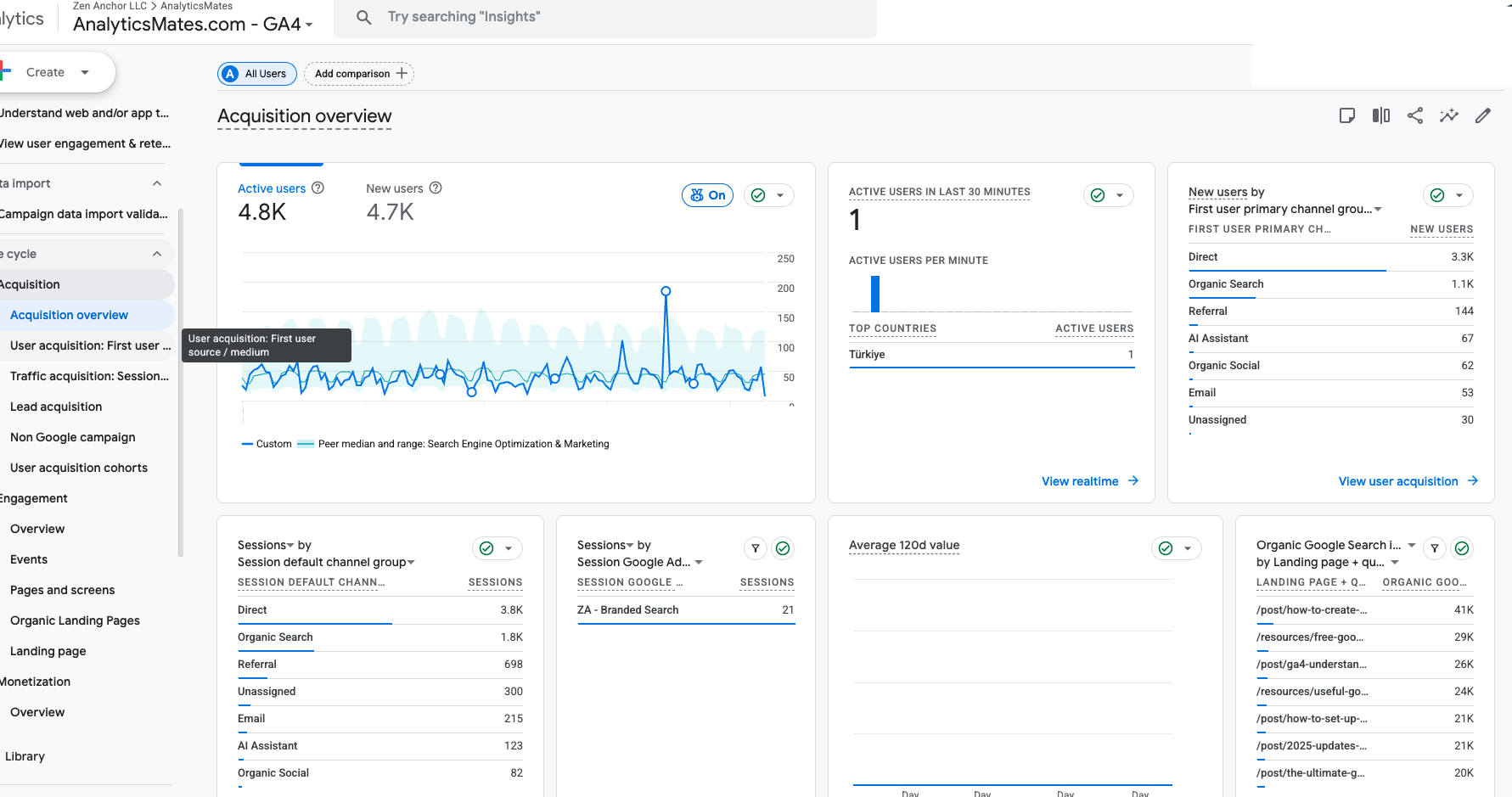
First-user primary channel group on our own property: Direct 3.3K new users. Organic Search 1.1K. Referral 144. AI Assistant 67. Organic Social 62. Email 58. Unassigned 30.
Session default channel group tells a similar story. Direct 3.8K sessions. Organic Search 1.8K. Google Ads branded search: 21 sessions.
Direct is the largest first-user channel on a measurement company’s website. That is not a traffic win. Direct is where source goes to die — dark social, untagged links, returning visitors, AI referrals that never sent a clean referrer. If we only trusted that Acquisition overview, we would have a story about “Direct.” We would not have a story about which post, which campaign, or which call produced a consultation.
We have written about the GA4 vs Google Ads gap before. The 2024 attribution-model guide is about how GA4 assigns credit. The 2026 founders’ guide is about why Ads and GA4 still disagree even when both are working: models, conversion counting, lookback windows, cross-device, processing time, implementation. Those differences still matter.
There is another problem once you connect either of those platforms to a CRM:
The customer journey does not end when someone submits a form.
GA4, Google Ads, and your CRM are answering different questions
Teams get angry at attribution because they are comparing totals from systems built for different jobs.
GA4 asks: how did the user get here, and what did they do?
Someone can find you in organic search, come back on a paid click, visit again as Direct, and then submit a form. GA4 is built for that path — sessions, channels, events, key events. It usually has no idea what the sales team did after the lead landed in the CRM.
Google Ads asks: did advertising contribute to this conversion?
I opened our Google Ads Goals for August 14 – September 10, 2026.
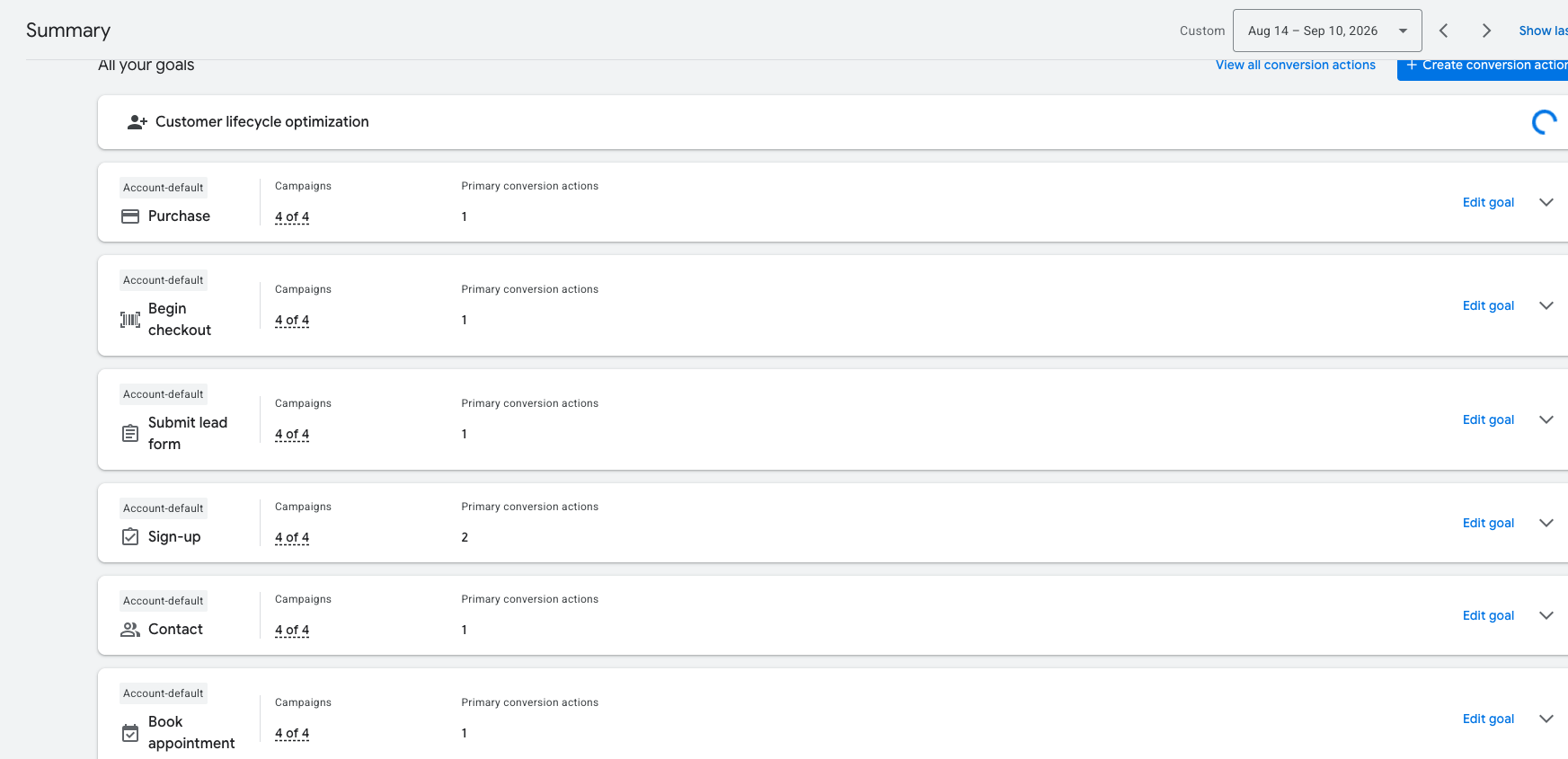
Account-default actions: Purchase. Begin checkout. Submit lead form. Sign-up. Contact. Book appointment. All four campaigns.
We are not an ecommerce store. Purchase and Begin checkout are not how Analytics Mates gets paid. If those stay in the conversion story, Ads is answering a question our pipeline never asks. Submit lead form, Contact, Sign-up, and Book appointment are closer — and they are still not “this became a customer.”
That is why GA4 and Google Ads do not need identical totals to both be useful. It is also why a linked GA4 property can import the wrong moment into bidding. We wrote the Ads-side version of this: Smart Bidding will buy form fills if that is the conversion it can see.
Your CRM asks: what happened to the lead?
The CRM may know they booked, qualified, got an estimate, signed, or paid. That is the business. It often has a much weaker idea of how they found you.
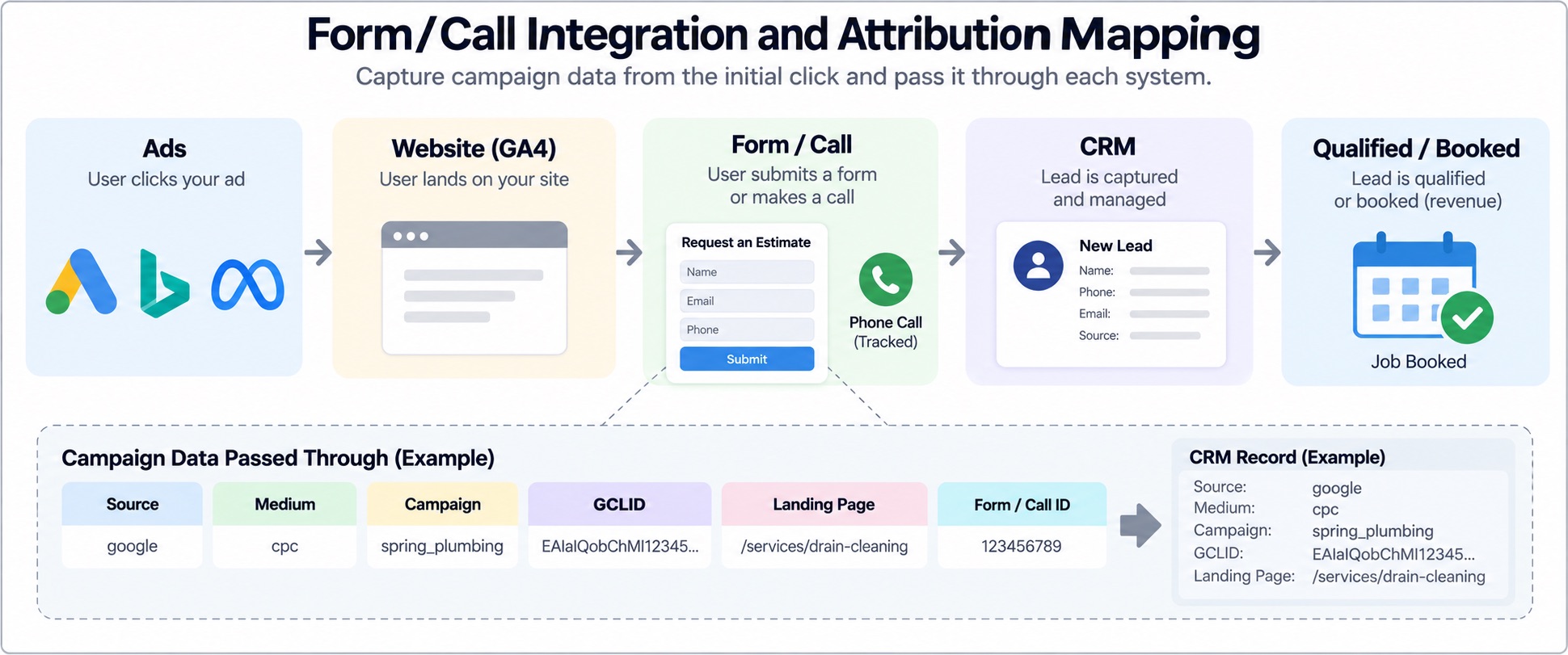
A client thought tracking was broken because they could not connect Google Ads phone calls and form submits to the intake in the CRM. The lead existed. The GCLID did not. Sometimes it was never captured. Sometimes it was captured on the site and dropped before the CRM write. The campaign connection died; the person did not.
Another fulfillment meeting: attribution looked random because GCLIDs were truncated. The CRM field had a character limit. The tag was firing. The form was submitting. The identifier was being cut off on the way in. The flow was not “broken.” The system of record could not store the key.
A lead can have three different attribution stories
A simplified path. Someone clicks a paid search ad, browses, leaves. Three days later they come back through organic. A week later they click another Google ad and submit a form. They talk to sales, book, become a customer.
Google Ads may give the conversion to advertising. GA4 may show Paid Search and Organic Search on the same path. The CRM may say “Google,” “Web,” “Paid Search,” or whatever string happened to be in the source field when the record was created.
None of those descriptions automatically means the others are wrong. They are looking at different parts of the same journey.
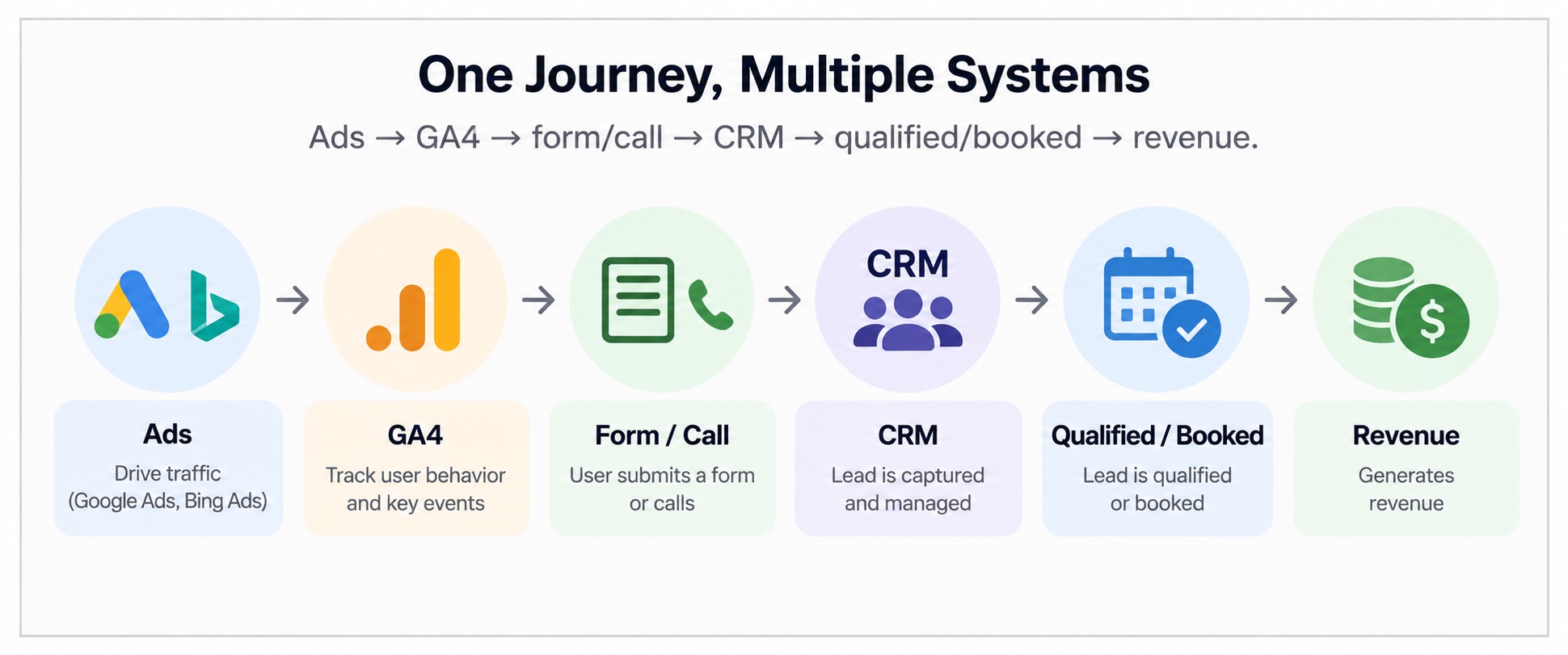
The bigger problem is not the discrepancy. It is lost attribution data.
A difference between GA4 and CRM totals is not proof that tracking is down. Missing identifiers are.
We have reviewed implementations where the lead made it into the CRM and the marketing metadata did not:
- GCLID was never passed with the lead.
- Source and medium were not captured.
- UTMs disappeared after a redirect or a navigation.
- Call tracking was not written onto the CRM record. (Google’s View call report will not do that job for you.)
- The form integration created a lead with no campaign fields.
- Duplicates made matching a later conversion guesswork.
- The CRM stored a generic source: “Google.”
- The offline outcome never went back to the ad platform.
Getting GA4 and the CRM to print the same number is not the fix. Preserving the fields that connect the click to the outcome is.
A plumbing client watched form-lead volume go flat. The cause was a DNI script change. The old script was not only swapping phone numbers. It was also the thing capturing website form submits. Call tracking looked “updated.” Forms had gone dark. The CRM still had a supported integration path. They kept the new DNI script and restored form capture through that path.
The stack had not “stopped matching.” A handoff in the chain had been replaced and nobody had re-checked the form.
Think of attribution as a data chain
Instead of “why doesn’t GA4 match the CRM?”, ask: can we follow this lead from acquisition to revenue?
Ad or channel → website visit → form or phone call → CRM lead → qualified lead → appointment or booking → customer → revenue.
Every handoff is a place to lose the story.
- If the GCLID dies between the landing page and the CRM, Google Ads cannot see the booked job. That is an offline conversion import problem, not a reporting-theme problem.
- If UTMs die before the submit, source in the CRM becomes folklore.
- If the call record does not inherit the session that produced the number, paid search did not “fail.” The join failed.
- If the CRM knows who became a customer and Ads never hears it, bidding keeps buying leads instead of good leads. Meta has the same shape of problem on CAPI. GA4 has it on the Measurement Protocol.
Not all conversions are equal
A form submit is not a successful marketing outcome. Two campaigns:
| Campaign | Leads | Qualified opportunities | Customers |
|---|---|---|---|
| Campaign A | 100 | 10 | 2 |
| Campaign B | 60 | 25 | 12 |
Optimize against form fills and Campaign A looks stronger. Look at CRM outcomes and Campaign B is the business.
The job is not more conversion events. The job is to teach measurement and bidding which conversions actually matter.
Once the foundation is trustworthy, keep watching it. A theme change, a DNI swap, a CRM field limit, a new form tool — those are how a working chain goes quiet. Audit after site changes. Anomaly detection is how you notice before the monthly meeting.
So which platform should you trust?
Trust each one for the question it is built to answer.
- GA4 — site behavior, acquisition, journeys, how touchpoints contribute to on-site conversions.
- Google Ads — paid search performance and bidding.
- CRM — lead quality, sales outcomes, customers, revenue.
Then connect them.
Do not pick the dashboard with the number you like. Do not spend a week forcing every report into agreement. Write the definitions down: what is a lead, a qualified lead, a booked appointment, a sale. Which identifiers have to move. Which conversion action is Primary.
What we wish we knew earlier
Attribution used to mean models: first click vs last click, data-driven, lookback windows, assisted conversions. Those still matter.
The more practical lesson from real stacks:
Your attribution model is only as useful as the data that survives the customer journey.
You can have a perfect GA4 model and still not know ROI if the join between the website, the phone system, the CRM, and the ad platforms is broken. Comparing platforms is fine. Confirm the integrations first. Otherwise you are reading a missing field as a media result.
Don’t make the numbers match. Make the journey connect.
Some discrepancy between GA4, Google Ads, Meta, call tracking, and the CRM is normal. Different systems. Different jobs. Different visibility.
What is not normal is being unable to explain where your best customers came from. If GA4 says a lead happened, the CRM should be able to say what happened next. If the CRM says that lead became a customer, the ad platforms should get enough of that outcome to learn.
Don’t make every platform tell the same story. Make sure you can connect the story from the marketing interaction to revenue.
What to do this week
- Write the three numbers down for the same date range: GA4 key events that you treat as leads, Google Ads conversions, CRM leads. Do not reconcile them yet. Just look at them.
- Open your Ads Goals. Note which actions are Primary, and whether any of them are default events your business does not actually run (Purchase and Begin checkout on a services account is the tell).
- Pick one lead from last week. Can you find a GCLID or a clean source/medium/campaign on the CRM row? If the field is blank, truncated, or “Google,” that is the gap — not the mismatched totals.
- Check the form and the call path separately. A DNI or call-tracking change can kill forms without touching Ads. Confirm the hidden fields still write on submit.
- Decide which outcome bidding should see. Form fill, qualified, booked, or revenue. If Ads cannot receive that event today, the next project is identifier capture and import — not a new attribution model.
If you want that chain as an operation — capture the identifier at origination, keep it through the CRM, send the real outcome back, verify it landed — that is Signal Dispatch. Book a consultation if you want us to trace one lead across GA4, Ads, the form or call, and the CRM in a single pass.
Keep reading
- Black Friday 2026: What's New in GA4, GTM, and Marketing Measurement?
Audit GA4 and GTM before Black Friday 2026. Validate purchase values, then review Google’s tagging and Ads updates. A new feature does not fix a broken purchase event.
- How to Grant Analytics Mates Access to Your Marketing and Analytics Platforms
One guide for granting Analytics Mates access across GA4, Google Tag Manager, Google Tag, Search Console, Bing Webmaster Tools, Microsoft Advertising, Google Ads, and Meta. Use the in-page links to jump to the platform you need.
- GA4 vs. Google Ads Attribution: A Founder's Guide to What's Changed in 2026
GA4 vs Google Ads attribution explained. Why do conversions not match? In this 2026 guide, learn how attribution models, data gaps, and tracking differences impact your numbers and how to use both platforms together to understand performance and make better marketing decisions.
Work with us
Need this done for your property?
Analytics Mates handles GA4 setup, GTM implementation, Looker Studio dashboards, and the ongoing measurement operations that agencies and in-house teams don't have bandwidth for.