
GA4 Measurement Protocol: Tracking Offline Conversions and Backend Events
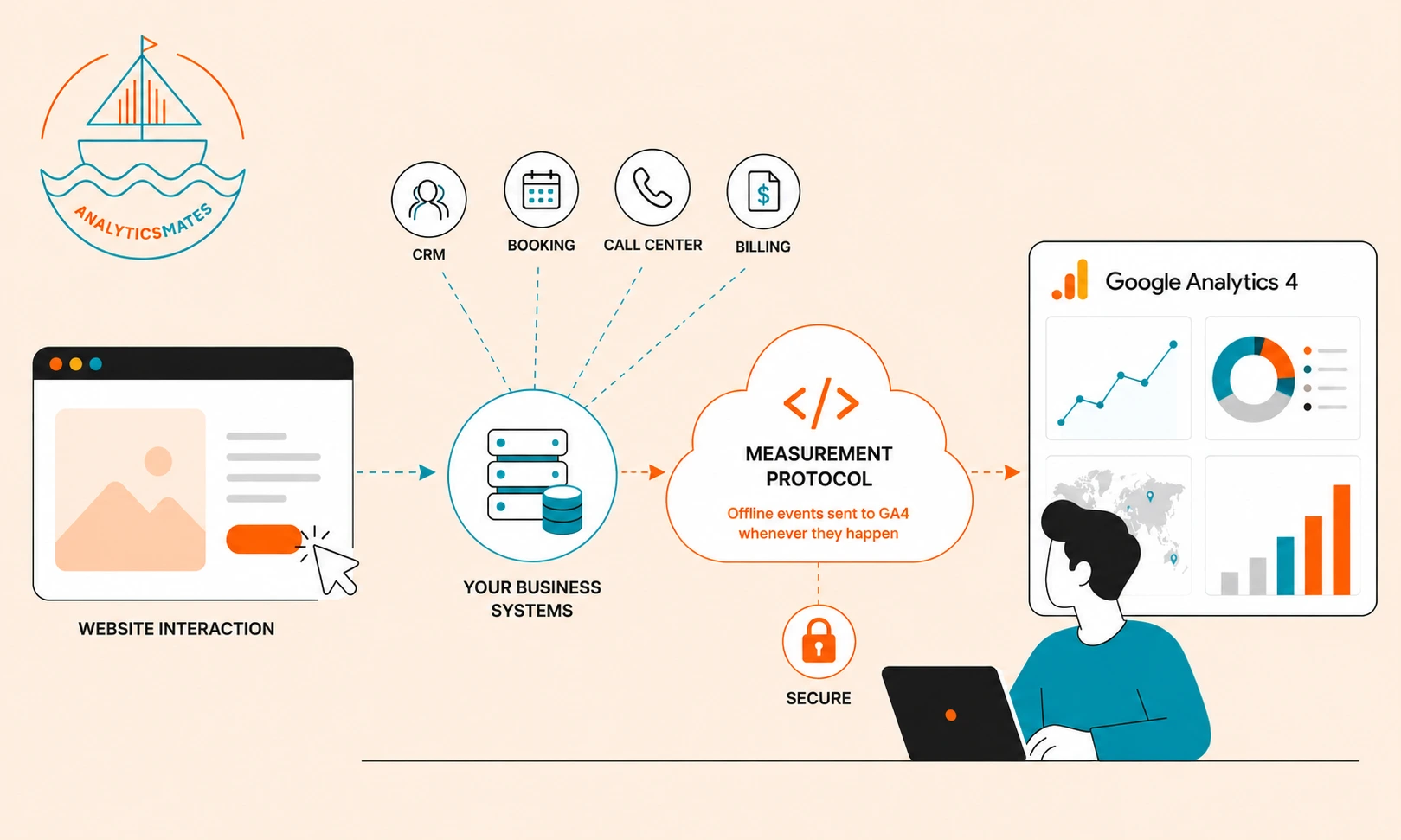
Google Analytics 4 does a good job at tracking user interactions on websites, that is, page views, button clicks, purchases, downloads, form submissions, and hundreds of other interactions.
But businesses don’t make money from page views.
They make money when someone becomes a customer.
For many organizations, that happens somewhere else.
A sales representative qualifies the lead inside the CRM. A prospect books an appointment over the phone. A customer signs a contract weeks later. An invoice gets paid. A subscription renews automatically.
Those moments often determine whether marketing was successful.
Unfortunately, GA4 doesn’t automatically know any of them happened.
That’s the gap Measurement Protocol (MP) was designed to solve.
Rather than measuring only what happens inside the browser and data being passed to GA4, MP allows your business systems to send important events directly into GA4. Suddenly, your reports begin reflecting the entire customer journey instead of only the website visit.
That changes the quality of every marketing decision you make.
What Is Google Analytics 4 Measurement Protocol?
Measurement Protocol is Google’s server-to-server method for sending events directly into Google Analytics 4.
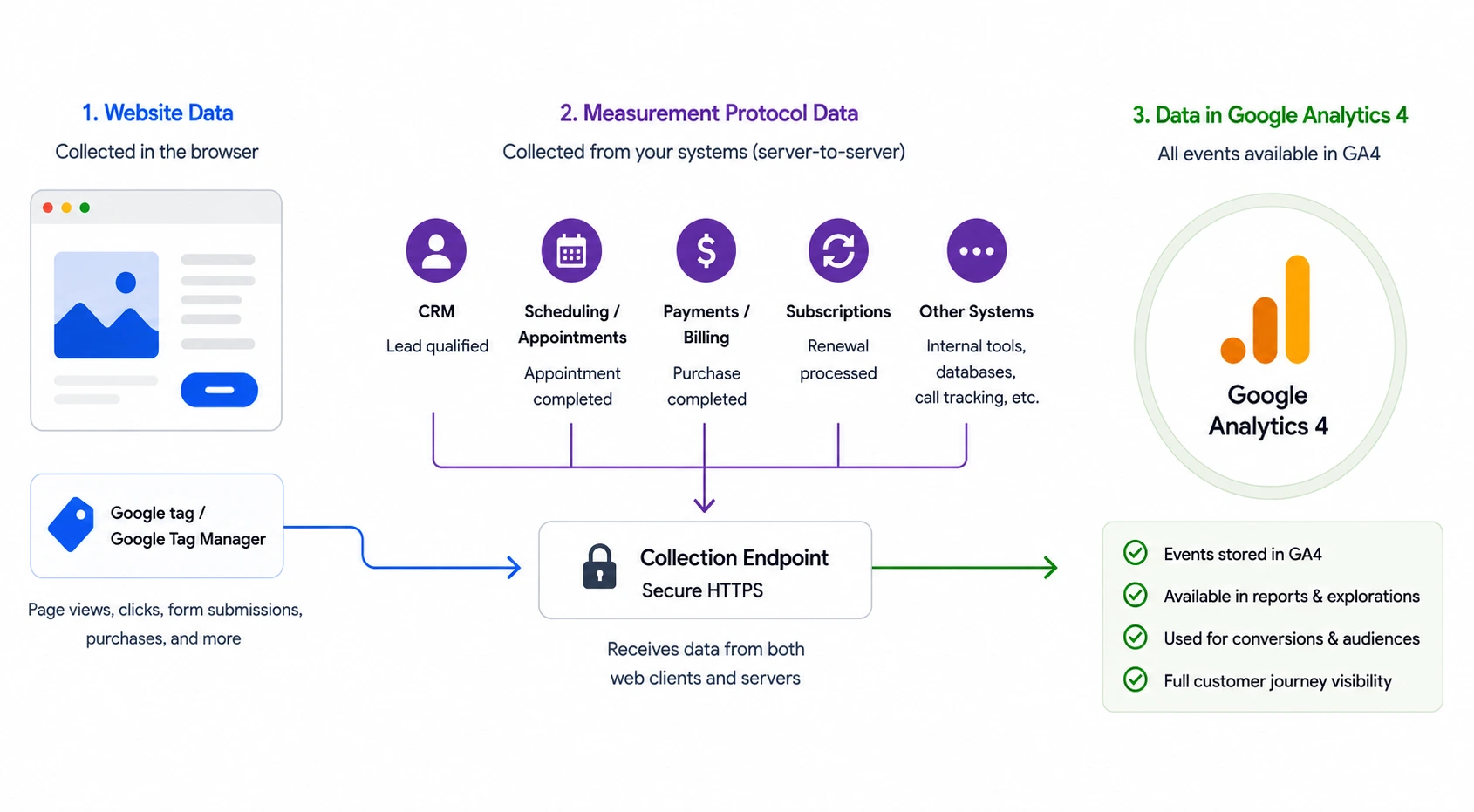
Instead of relying on JavaScript running inside someone’s browser, events are sent from your own systems.
That might include:
- Your CRM
- Booking software
- Point-of-sale systems
- Subscription platforms
- Internal applications
- Call center software
- Backend databases
Whenever an important business event happens outside the website, Measurement Protocol allows GA4 to learn about it.
It’s important to understand what it isn’t.
Measurement Protocol does not replace Google Tag Manager.
It does not replace the Google tag.
Those tools remain the best way to measure activity on your website.
Measurement Protocol simply extends your implementation so GA4 understands what happened after visitors left.
Think of it as adding missing chapters to a book you’ve already started writing.
Your Website Isn’t the Whole Story
Imagine someone visits your website after clicking a Google Ads campaign.
They read a few pages.
Complete your contact form.
Then they disappear.
From GA4’s perspective, that’s the end of the journey.
But your business knows better.
Your sales team calls them the following day.
They qualify the opportunity.
Two weeks later the deal closes.
Three months later they’re one of your highest-value customers.
None of those milestones appear inside Google Analytics unless another system tells it they happened.
That’s an important distinction.
Marketing teams often celebrate lead volume because that’s the last thing their analytics platform can see.
Sales teams care about qualified opportunities.
Executives care about revenue.
When every department measures success differently, reporting becomes fragmented.
Measurement Protocol helps bring those stories back together.
Instead of ending at the lead, analytics continues through the customer lifecycle.
Why Businesses End Up Optimizing the Wrong Things
This is where we see companies make expensive decisions.
Imagine Google Ads is optimizing toward form submissions.
Campaign A produces 100 leads.
Campaign B produces 40.
Most marketers would declare Campaign A the winner.
But what if the CRM tells a different story?
Campaign A produced five qualified opportunities.
Campaign B produced twenty-five.
Without CRM data flowing into GA4, marketing keeps investing in the wrong campaign.
Everyone believes performance is improving.
Revenue tells a different story.
Measurement Protocol allows businesses to optimize toward outcomes instead of activity.
That’s a very different way to think about analytics.
When Should You Use Measurement Protocol?
Measurement Protocol is worth considering whenever important business events happen outside your website. If conversions are recorded in a CRM, revenue is generated offline, sales are closed by your team, or multiple business systems contribute to the customer journey, it can help bring those events into GA4.
For standard website interactions such as page views, button clicks, downloads, or form submissions, your existing GA4 implementation and Google Tag Manager are usually the better choice. Measurement Protocol works best as an extension of your current tracking, not a replacement for it.
How Measurement Protocol Works
A Real-World Example
Imagine you’re tracking a law firm.
Monday
Someone visits your website and submits a Free Consultation form.
GA4 records a generate_lead event.
At the same time, your CRM stores information like:
- Lead ID
- Client ID
At this point, Google Analytics knows someone became a lead.
But it has no idea whether that person ever became a client.
A few days later…
Thursday
The attorney signs the client.
Inside the CRM, the lead status changes to Retained.
That change triggers a workflow that immediately sends a Measurement Protocol event to GA4. Depending on your implementation, that might be a purchase event or a custom event such as retained_client.
Now your analytics can answer questions that were impossible before:
- Which Google Ads campaigns generated retained clients?
- Which landing pages produced signed cases?
- Which traffic sources generated the most revenue?
This is exactly what the Measurement Protocol was built for.
It’s not about sending events immediately after someone visits your website. It’s about allowing your backend systems to report important business milestones whenever they happen—even if that’s days or weeks later.
Where Do You Set Up Measurement Protocol in GA4?
One thing that surprises many people is how little configuration actually happens inside Google Analytics.
GA4 doesn’t host or run the Measurement Protocol. Instead, it provides the credentials your server, CRM, or backend application uses when sending events.
Here’s where you’ll find them:
- Go to Admin.
- Under Data collection and modification, select Data streams.
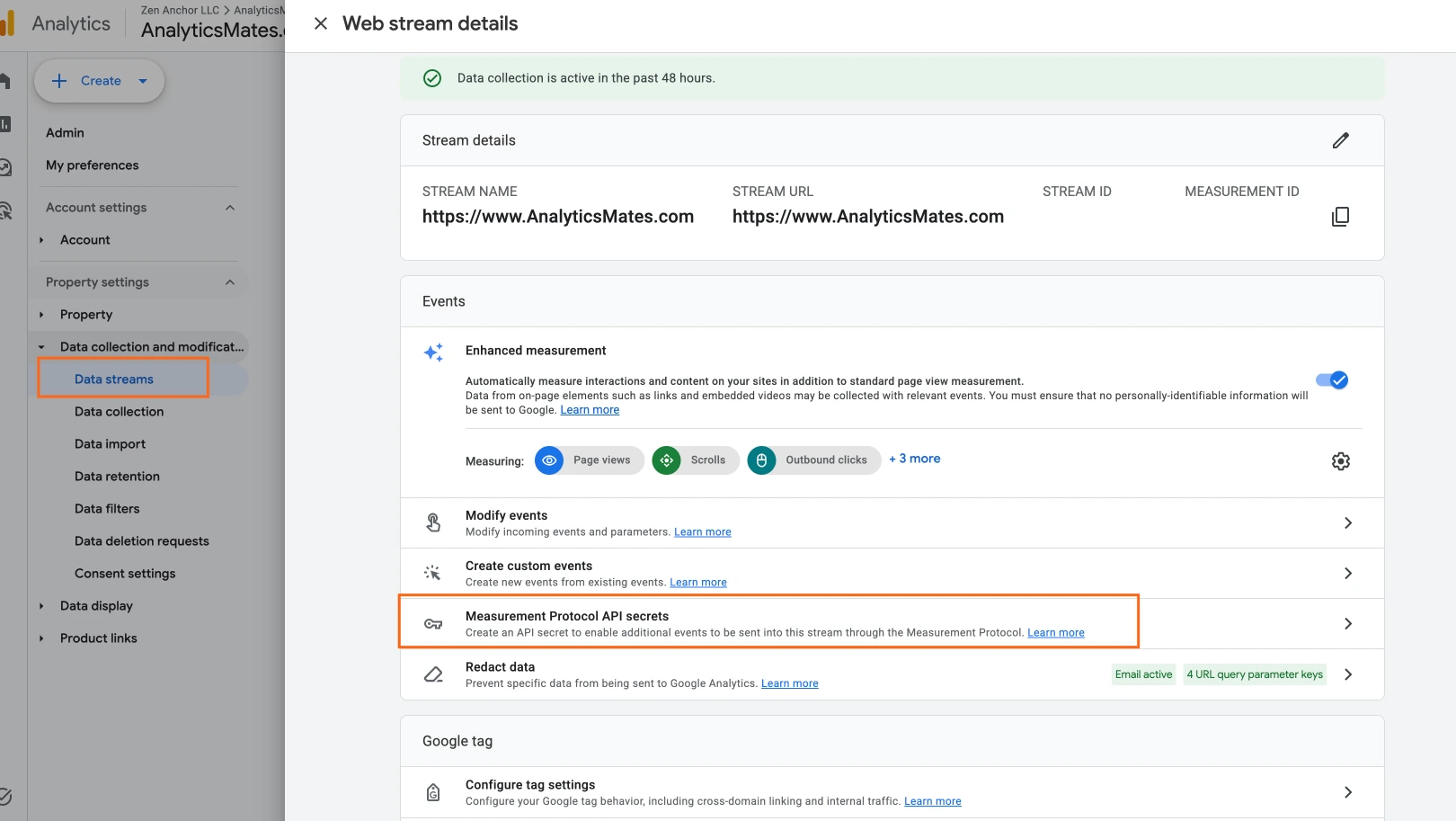
- Open your Web data stream.
- Scroll to Measurement Protocol API secrets.
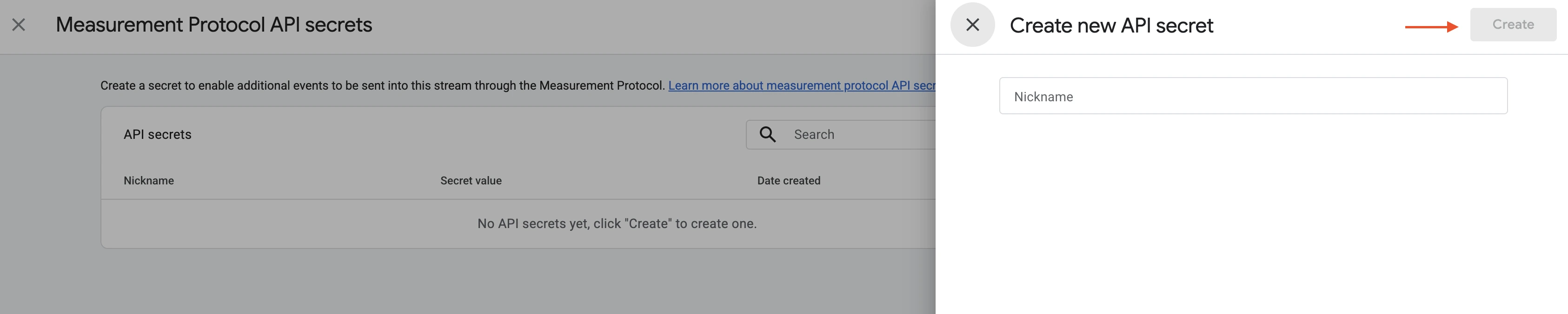
- Click Create.
- Give the secret a descriptive name such as CRM Integration or Salesforce.
- Copy the generated API Secret.
Near the top of the same page, you’ll also see your Measurement ID (for example, G-ABC123XYZ).
Your implementation will need both:
- Measurement ID
- API Secret
Those two values allow your backend systems to authenticate and send MP requests to your GA4 property.
Please note that this is only one part of the setup. Your server, CRM, or integration platform is responsible for generating and sending the events themselves. GA4 simply receives and processes them.
Measurement Protocol Is Powerful - But Only If You Know It’s Working
Sending events to GA4 is only part of the job. You also need confidence that those events continue arriving accurately over time.
We’ve seen implementations work without any issues after launch, but then break months later because of factors like website update, CRM change, or integration issue. So reporting becomes unreliable, and marketing decisions are based on incomplete data without anyone realizing it.
That’s where The Helm adds value. Rather than replacing Google Analytics 4, it helps organizations monitor, audit, and validate the health of their measurement ecosystem. From tracking advance conversion events to identifying implementation issues before they affect reporting, it gives you greater confidence in the data they rely on every day.
Final Thoughts
Most organizations don’t have a data problem.
They have a visibility problem.
They’re measuring everything their website can see while missing the events that actually determine business success.
Measurement Protocol closes that gap.
It extends Google Analytics beyond the browser and into the systems where real business decisions happen.
The result isn’t just better reporting.
It’s better marketing.
Because when analytics reflect the complete customer journey, every decision becomes a little easier to make.
Frequently Asked Questions
Can Measurement Protocol improve Google Ads optimization?
Yes, especially if your business relies on qualified leads or offline sales. By sending meaningful conversion events to GA4, you can provide Google Ads with better data to optimize campaigns around real business outcomes rather than just website activity.
Do I need a CRM to use the Measurement Protocol?
Not necessarily. CRMs are one of the most common data sources, however, Measurement Protocol can also receive events from other sources such as booking systems, point-of-sale platforms, internal applications, subscription systems, and other backend software.
Can offline conversions appear in GA4 reports?
Yes. Once they’re sent through the Measurement Protocol, offline conversions will show up alongside your website data.
Is Measurement Protocol only for large businesses?
No. Any business that tracks important customer interactions outside its website can benefit from it.
How do I know if my business needs a Measurement Protocol?
Does an important customer action happen after someone leaves your website? If so, then there’s a good chance the Measurement Protocol can help fill that reporting gap.
How can I tell if my Measurement Protocol events are working?
Google provides tools for validating events during implementation, but ongoing monitoring is just as important. Like what’s mentioned above, website updates, CRM changes, and integration updates can affect data collection over time, so it’s a good idea to review your implementation from time to time.
Does Measurement Protocol help with attribution?
Yes. When MP sends offline and backend events into GA4, businesses gain a clearer understanding of which marketing channels contribute to qualified leads, sales, and revenue instead of measuring only website interactions.
What’s the biggest mistake businesses make when using the Measurement Protocol?
The most common mistake is trying to use it as a replacement for browser tracking. The best implementations combine Measurement Protocol with Google Tag Manager and GA4 so they capture both website activity and the business events that happen later in the customer journey.
Thank you for reading!
We’re always looking for ways to improve our Google Analytics 4 blog content. Please share your feedback so we can make it even better.
Keep reading
- How to Grant Analytics Mates Access to Your Marketing and Analytics Platforms
One guide for granting Analytics Mates access across GA4, Google Tag Manager, Google Tag, Search Console, Bing Webmaster Tools, Microsoft Advertising, Google Ads, and Meta. Use the in-page links to jump to the platform you need.
- What Small Law Firms Should Actually Be Tracking in GA4
Most small law firms don’t have a traffic problem - they have a tracking problem. Learn the GA4, GTM, attribution, and conversion tracking issues we keep finding in law firm audits, plus what firms should actually track to improve reporting and marketing decisions.
- How to Build an AI Search Visibility Dashboard in Looker Studio
Learn how to build an AI Search Visibility Dashboard in Looker Studio using GA4, Google Search Console, Bing Webmaster Tools, and curated query sets. Discover how to track conversational search behavior, AI-aligned visibility trends, and meaningful discovery signals without overcomplicating reporting.
Work with us
Need this done for your property?
Analytics Mates handles GA4 setup, GTM implementation, Looker Studio dashboards, and the ongoing measurement operations that agencies and in-house teams don't have bandwidth for.