
Black Friday 2026: What's New in GA4, GTM, and Marketing Measurement?

Black Friday traffic can look great in a report. If purchases are missing, revenue is duplicated, or paid campaigns land under Direct, those numbers will not tell you much.
Before the holiday campaigns go live, check whether GA4, Google Tag Manager, and your reporting can handle the extra activity. Google has shipped useful updates since last Black Friday. None of them fixes an incorrect purchase event. Here is what we would review first.
What’s changed since Black Friday 2025?
In our Black Friday reporting guide, we covered the fundamentals of GA4 reporting and how to measure holiday campaign performance.
A lot has moved since then. These are the updates worth knowing as you prepare for Black Friday 2026:
- First-party tagging: Google tag gateway can route measurement requests through your own website infrastructure.
- Google Ads channel priorities and budgets: optional controls for eligible advertisers to set channel priority and cap spend on lower-priority inventory. The rollout is still in progress.
- Performance Max channel reporting: more detail on where impressions, clicks, and conversions are coming from.
- GA4 key event lookback windows: you can change how far back a touchpoint is eligible for conversion credit.
Not every feature will be available, or relevant, in every account. Start with the tracking you already have.
1. Audit your GA4 and GTM tracking
We have seen tracking stop working after a routine website change. A redesigned form, an updated checkout, or a new consent banner can affect events that have been running for months. Having GA4 and GTM installed is not the same as knowing they are working.
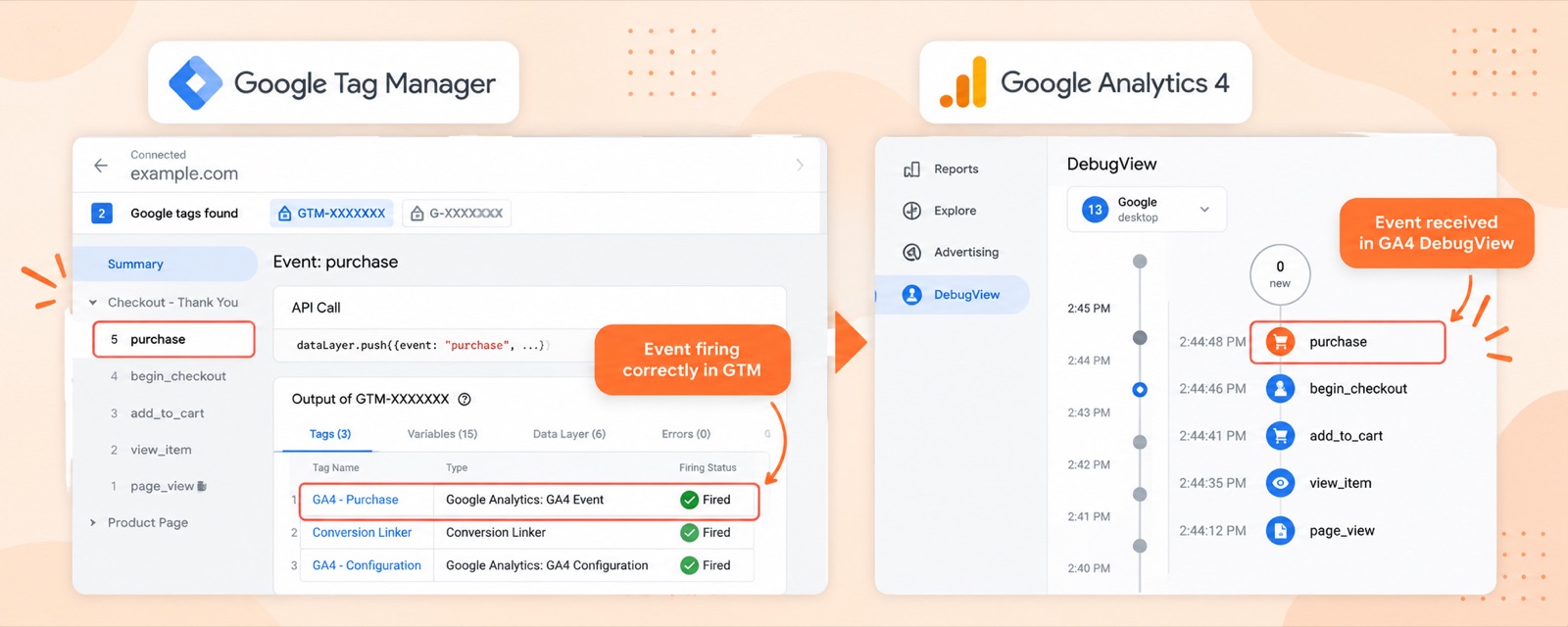
Check the essentials before you launch:
- GA4 coverage. Are the right pages and domains collecting data?
- Duplicate events. Is anything firing twice, especially
purchase? - GTM setup. Do tags, triggers, variables, and recent changes still make sense?
- Cross-domain journeys. Can users move between relevant domains without unnecessary session breaks?
- Consent. Does tracking behave as intended for different consent choices?
- Desktop and mobile. Do the important actions work, and get recorded, on both?
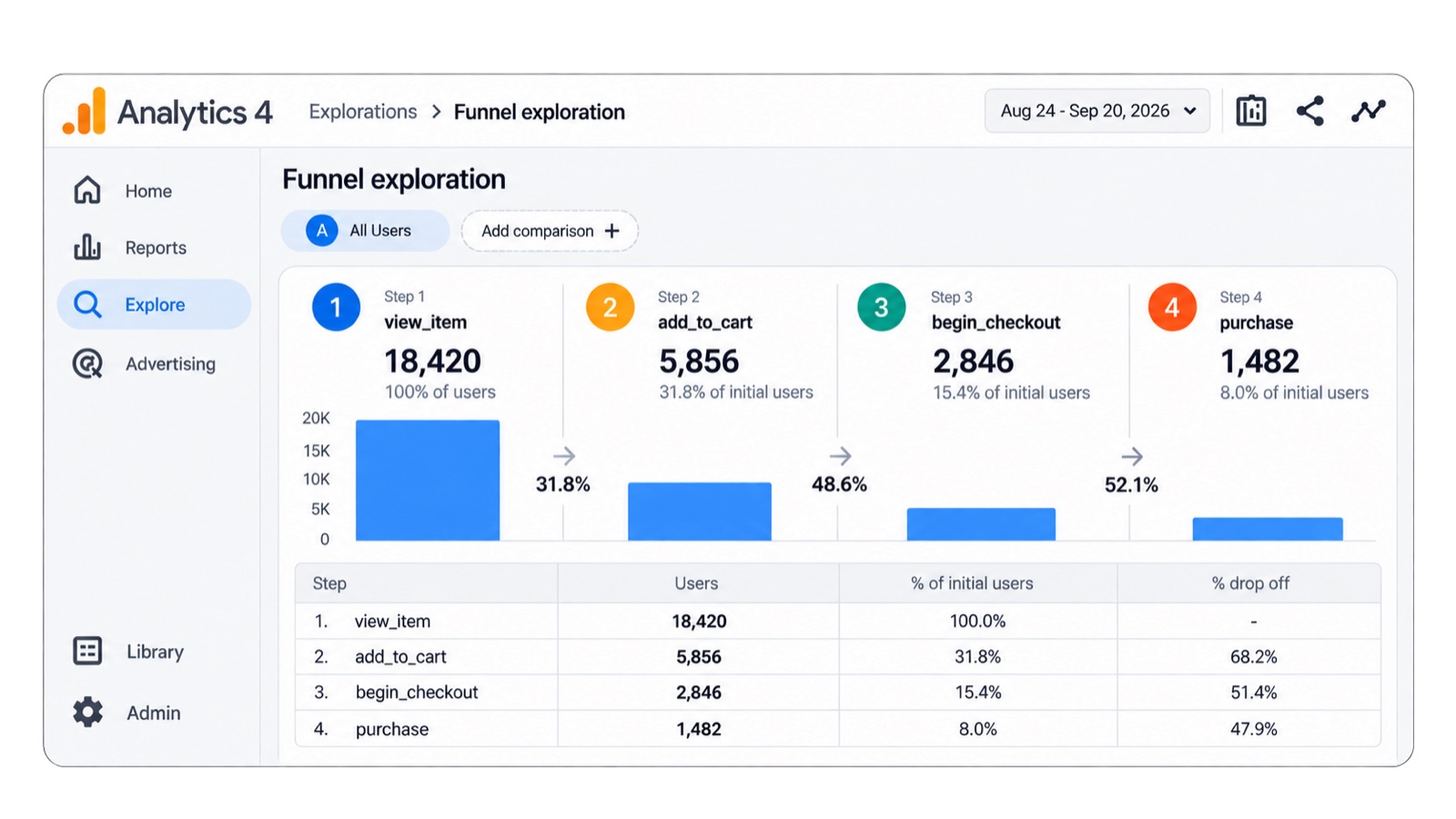
For ecommerce, follow a test customer through view_item, add_to_cart, begin_checkout, and purchase. Check that each event fires at the right point, not simply that it appears somewhere in DebugView.
Need a starting point? Our GA4 audit resources and checklist can structure the review.
A few GTM changes worth knowing about
Google has introduced tagging updates that are worth reviewing before Black Friday, especially for data collection and change control.
The expanded Google tag gateway integrations can route measurement requests through your website’s infrastructure. That may help with data collection. It needs proper implementation and testing.
There is also an optional Google tag and GTM optimization for eligible containers. It can bring settings together and reduce the need to load a separate gtag.js file. Review the proposed changes before publishing, especially if several Google tags are already in place. We wrote the judgment on that banner in Google is changing how tagging works: do not Optimize a production container because a banner asked you to.
One smaller but useful addition: GTM can suggest version names and descriptions based on workspace changes. Better release notes will not prevent an issue. They make it easier to work out what changed when something breaks.
We would not rush a new tagging setup into production right before Black Friday. If your current setup works, test any proposed improvement carefully and leave enough time to verify the results.
2. Check the conversions and values that matter
A page view, a newsletter signup, and a completed order should not carry the same weight in your reporting. For Black Friday, purchases and their values need particular attention.
For a sample of test orders, check that GA4 records the correct transaction ID, revenue, currency, items and quantities, and any relevant coupon details. Make sure refunds are handled correctly where they apply.
Then compare those orders with your ecommerce platform. GA4 and your store will not always show identical totals. A missing order, a repeated transaction, or a wrong purchase value is something to investigate now.
This matters beyond the GA4 report. Google Ads is testing a Target ROAS calculator that turns a profit margin into a suggested target. It is not bidding on profit by itself. It still assumes the conversion value you send is revenue. A campaign can drive revenue without delivering the return a business expects. Reliable conversion values give teams a better basis for evaluating that performance.
If you are using enhanced conversions, first-party customer data, or offline conversion imports, check that the setup is accurate, eligible, and respects consent. Keep the immediate priority simple: can you trace a real test order to one accurate purchase event?
3. Review campaign tags and attribution
One thing we regularly check is whether campaign traffic is being classified correctly. We have seen untagged campaigns show up as a rise in Direct while Paid appears to fall. That can lead to the wrong conclusion about which campaigns worked.
Black Friday shoppers rarely arrive through just one channel. Someone might see a search ad, return from social, then purchase after an email. Consistent campaign tagging helps you make sense of those visits.
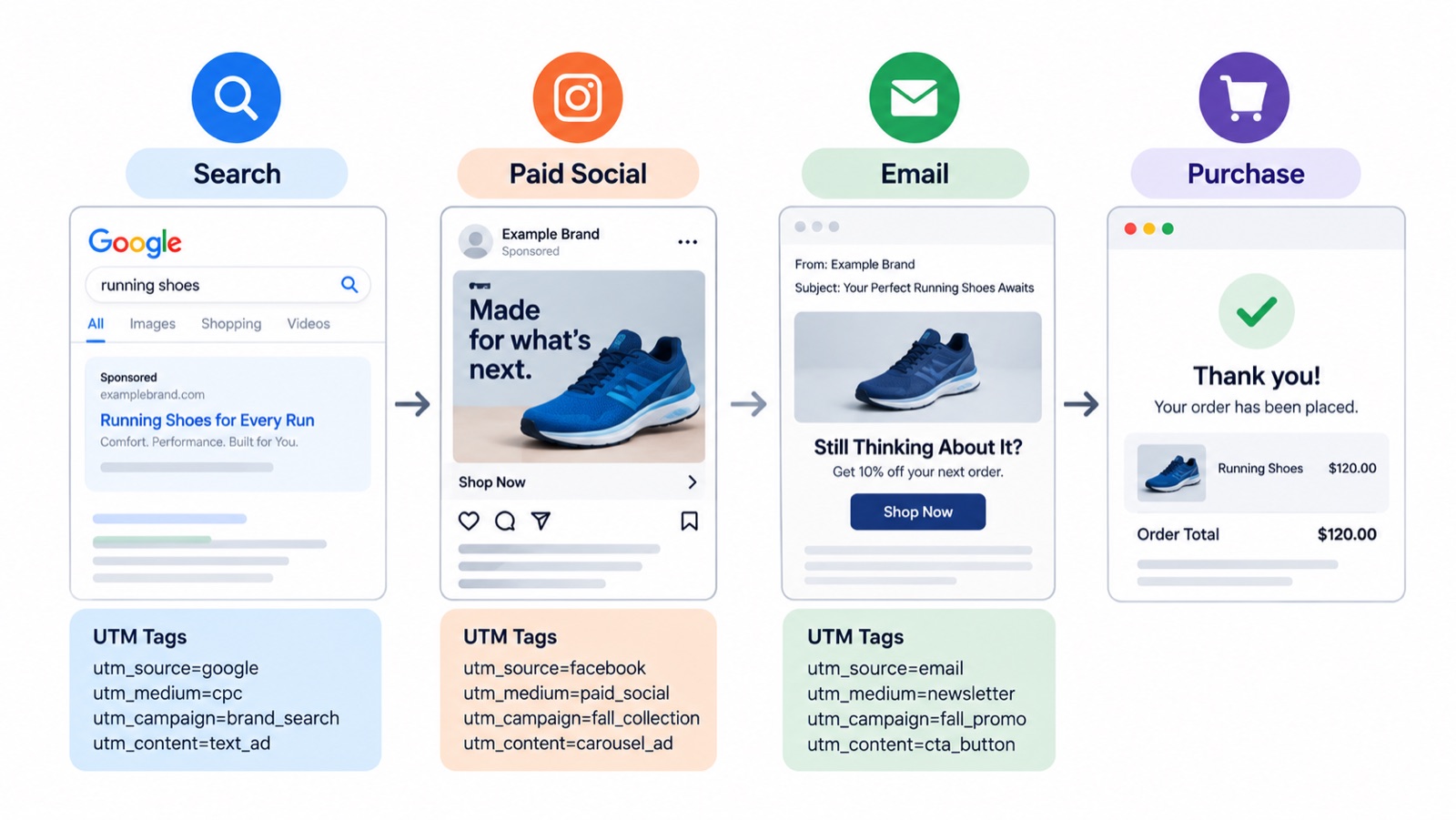
Agree on UTM naming before anyone sends a campaign link. At a minimum, review utm_source, utm_medium, and utm_campaign. Use utm_content when you need to distinguish creatives or placements.
Example:
utm_source=newsletter&utm_medium=email&utm_campaign=black_friday_2026
Keep capitalization and naming consistent. BlackFriday, black_friday, and black-friday can fragment reports when teams use them interchangeably. For more examples, see our Black Friday UTM tagging guide.
Don’t expect every platform to match
Even with clean UTMs, GA4 and Google Ads may report different conversion totals. They can use different attribution rules, reporting windows, identity methods, and consent-related measurement.
GA4’s key event lookback window is worth checking this year. For most conversion events the default is 90 days; 30 and 60 days are also available. Engaged-view key events default to 3 days. Acquisition events (first_open, first_visit) default to 30 days, with a 7-day option. Check whether the settings fit your buying cycle, and record them before comparing this Black Friday with older campaigns.
The goal is not to force the reports to match. It is to know why they differ, and to spot gaps that do not make sense.
Keep an eye on channel changes
Google Ads recently announced channel prioritization and budget allocation controls for eligible advertisers. These include optional priority tiers and best-effort budget allocations. Check availability in your account before building a holiday plan around them, and monitor spending closely if you use them.
GA4 also introduced an AI Assistant traffic channel for referrals from recognized AI assistants. If it appears in your property, include it in your channel review. Look at engagement and conversions rather than assuming it is already a major source of sales.
4. Build your reporting before the rush
Black Friday weekend is not the time to discover that a dashboard is missing revenue, or that two reports use different definitions of a conversion.
Decide what your team needs to see before the campaigns begin. Purchases, revenue, conversion rate, traffic by channel, and campaign results belong near the top. Add device performance and checkout drop-off where they are useful. The exact layout depends on what the business needs to act on.
You can start with our Looker Studio dashboard example for ideas on how to organize the information.
New reporting options in 2026
Google introduced customizable GA4 dashboards in September 2026. They are useful for keeping common metrics in one place, especially for teams that do not want to move between several reports.
Google Ads’ Performance Max channel reporting also gives more detail on impressions, clicks, and conversions by channel. That helps with investigation. It should not be the only view of performance.
For a broader report, Looker Studio can bring together GA4, Google Ads, Search Console, and other sources. Keep actual ecommerce orders and sales available as a separate check. We discuss the trade-offs in GA4 Dashboards Are Here. Are They Enough?.
Set a baseline
A 20% increase in revenue sounds good. What if traffic increased 50% and the conversion rate fell? That is why a baseline matters.
Before launch, save recent traffic and revenue, conversion rates by channel and device, previous promotional results, last year’s Black Friday numbers, and typical checkout abandonment. You will have something useful to compare against when activity changes.
Also remember that GA4 data can take time to process. Treat intraday figures as provisional, not final.
5. Test the customer journey, not just the tags
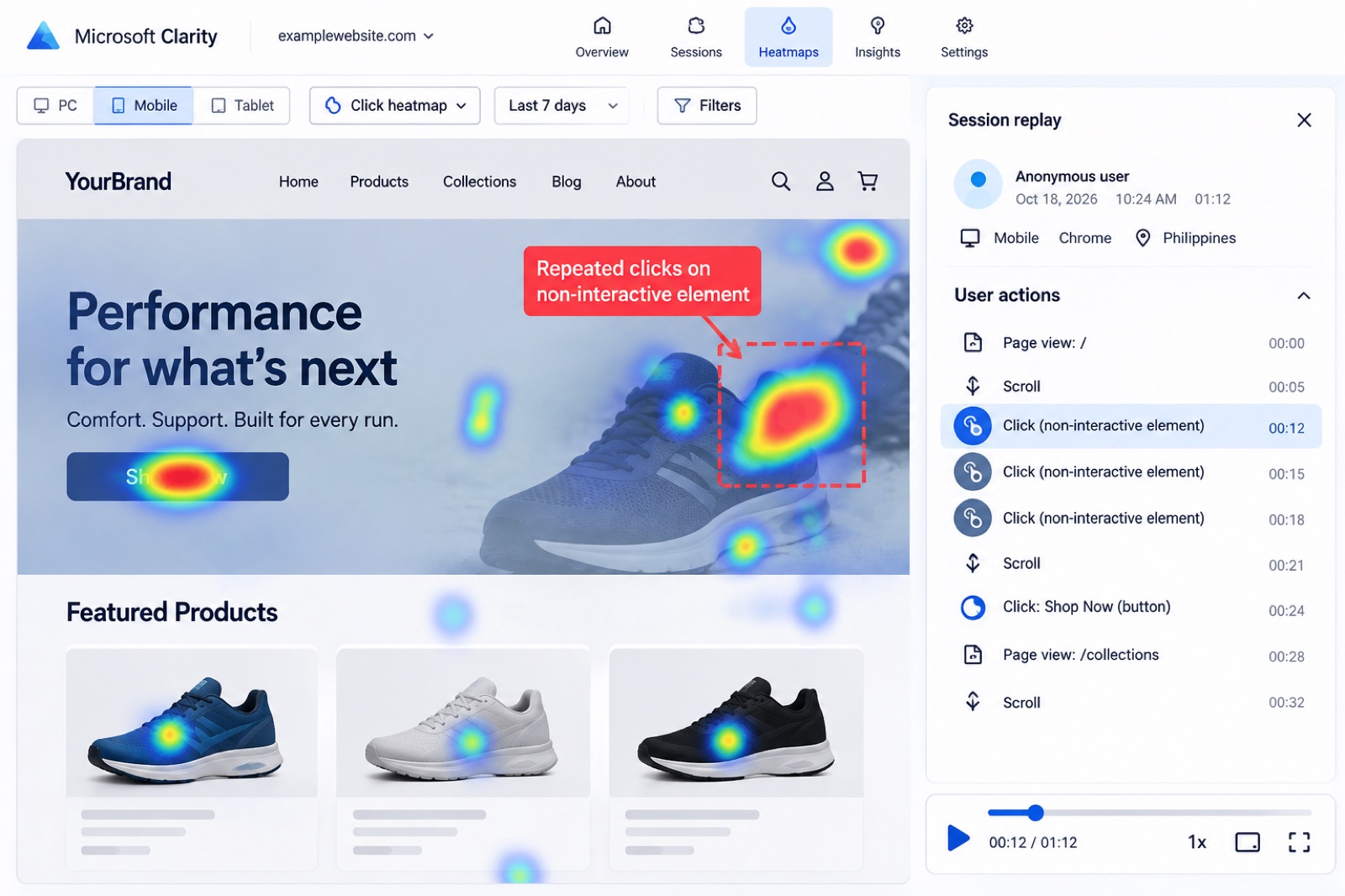
A tracking audit does not tell you whether the checkout experience is frustrating. Walk through the promotion on desktop and mobile: landing page, product selection, cart, coupon, payment, and confirmation. GA4 funnel explorations can show where people drop off. Microsoft Clarity recordings and heatmaps can help explain what happened. Repeated clicks on a non-interactive element are worth checking. Rage clicks alone do not prove a defect.
Black Friday 2026 measurement checklist
Before the campaigns go live, confirm that:
- GA4 and GTM have been audited, including consent and cross-domain settings.
- Ecommerce events fire once, at the right step, on desktop and mobile.
- Test orders match GA4 transaction IDs, revenue, currency, and item details.
- Important conversions and advertising integrations are configured correctly.
- Campaign links follow a consistent UTM naming convention.
- Attribution and conversion-window settings are documented.
- Dashboards are ready and checked against actual store orders.
- Previous performance baselines are saved.
- The full customer journey has been tested.
- Someone owns monitoring and troubleshooting during the campaign.
For 2026, also check whether the GTM optimization is relevant, whether the newer GA4 dashboards meet your needs, and whether AI Assistant traffic warrants a place in your channel review. These are useful extras, not substitutes for the checks above.
Final thoughts
You do not want to finish Black Friday with strong-looking campaign numbers and unanswered questions about the purchases behind them. Check the tracking, validate a few real orders, and build the reporting while there is still time to fix problems.
For the analysis after the rush, see our guide to Black Friday and Cyber Monday reporting in GA4.
Thanks for reading. You can also share feedback on our GA4 content.
After the tracking is solid
- How to Master Black Friday & Cyber Monday Reporting in GA4 (with AI & MCP Enhancements)
Master Black Friday and Cyber Monday reporting in GA4: realtime, Explorations, Looker Studio, and AI-assisted analysis once your tracking is solid.
- Drive Bigger Black Friday Wins With AI-Powered UTM Tracking
Optimize your Black Friday and Cyber Monday tracking with clean UTM setup, smarter GA4 reporting, and AI-powered analysis. Learn how to avoid misattribution, improve campaign accuracy, and scale what works using updated 2025 frameworks, tools, and step-by-step strategies.
- Google Is Changing How Tagging Works. What Does It Mean for GTM?
Google is merging the Google tag and GTM. Do not optimize a live container because a banner asked you to. Review, preview, then test the events that pay you.
Work with us
Need this done for your property?
Analytics Mates handles GA4 setup, GTM implementation, Looker Studio dashboards, and the ongoing measurement operations that agencies and in-house teams don't have bandwidth for.