
Free Resources
Free GA4 Looker Studio Templates
Looker Studio dashboards built by the Analytics Mates team — pre-configured for GA4 and ready to copy to your own Google account in seconds.
Connect your GA4
Sign in with Google and connect your Analytics property. Takes about 30 seconds.
Copy the template
Click "Copy Template" on any dashboard. It clones to your Google Drive and connects to your live data automatically.
Share or present
Share a link, embed in a client portal, or present directly. No manual data refresh — it updates live.
The templates
9 dashboards. Zero setup time.
Connect GA4 once and every template populates with your real data. All templates are free — no credit card, no trial.
 New for BFCM 2026
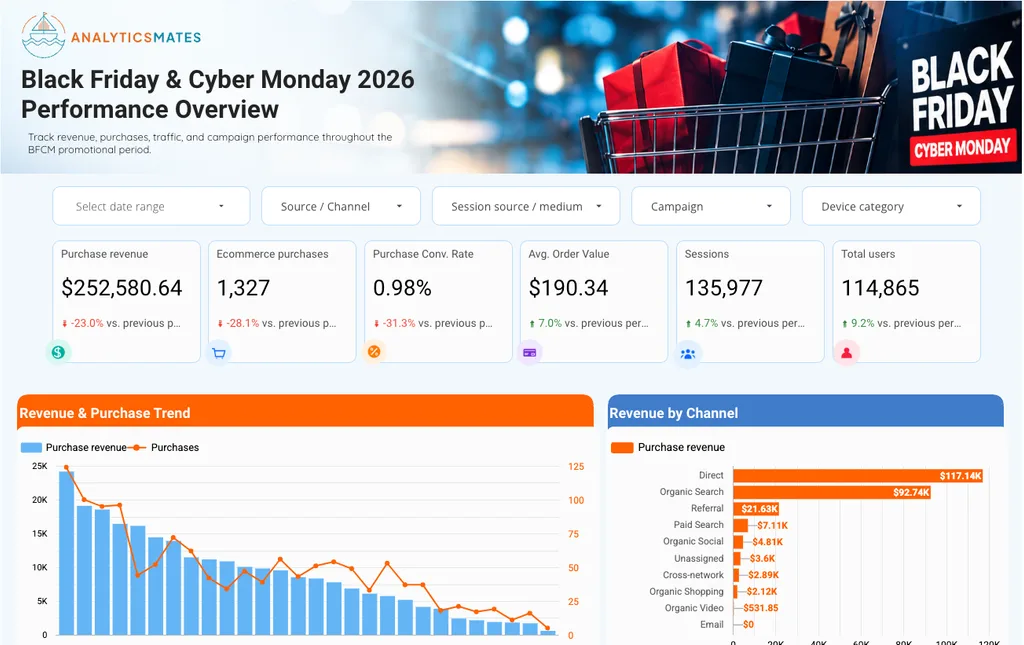
BFCM 2026 GA4 Dashboard
Revenue, purchases, conversion rate, AOV and channel mix across Black Friday and Cyber Monday, compared with the previous period. The Google Ads page fills in once you connect your own Ads account.
 Most Popular
GA4 Overall Performance Dashboard
A single at-a-glance view of your GA4 property — users, engagement, key events, and channel performance. The dashboard every stakeholder can read.
 Most Popular
PPC Report - Google Ads vs GA4
Compare Google Ads and GA4 performance side by side — spend, conversions, and where the two platforms disagree, so you can trust what your campaigns are optimizing toward.

SEO Report - GA4 Organic Search Data
Track organic search performance in GA4 — sessions, engagement, landing pages, and conversions from organic — in one shareable Looker Studio view.

SEO Report - GA4 vs Google Search Console
Organic performance, keyword rankings, and page-level click data from Google Search Console — visualised alongside GA4 organic traffic.

Data Studio Marketing Funnel Dashboard
Funnel visualisation examples for Looker Studio — see stage-by-stage drop-off across your marketing journey and where prospects fall out.

SEO Performance Dashboard (Search Console + CrUX)
A technical SEO view combining Google Search Console data with Chrome UX Report (CrUX) field data — surface hidden performance and Core Web Vitals issues.

GA4 Lead Generation Dashboard
Channel performance, form conversion rates, and cost-per-lead for agencies and in-house teams running paid media to landing pages.

SaaS GTM Performance Report
Acquisition, engagement, conversion, and retention in one view. Built for product and growth teams measuring trial-to-paid funnels.
Why these templates
Built from real client work, not spec sheets.
Every template here came from a live client engagement. We built them to solve real reporting problems — QBRs that clients actually read, dashboards that update themselves, and executive views that don't require a spreadsheet export every Monday morning.
They're free because we'd rather you experience what well-configured GA4 reporting looks like. If you want us to customise one for your property or fix the underlying data quality, that's what we do.
What our templates assume
- GA4 is the data source — not Universal Analytics
- Key events / conversions are configured correctly on your property
- Google Tag Manager is used for implementation (most templates)
- You have Looker Studio access (free with any Google account)
Tracking not set up correctly? Run a Free GA4 Audit →
FAQ
Questions about the templates.
Are these GA4 Looker Studio templates really free?
Yes. Every template on this page is free. Enter your email on a template card and we send you the copy link. No credit card and no trial.
Is Looker Studio the same as Google Data Studio?
Yes. Google renamed Data Studio to Looker Studio in October 2022. A "Data Studio template" and a "Looker Studio template" are the same thing, and every template here is built on the Google Analytics 4 connector (plus Search Console where the template says so).
How do I connect a template to my own GA4 property?
Open the copy link, choose Make a copy, and pick your own GA4 property as the data source when Looker Studio asks. The copy lives in your Google account and refreshes from your live data, so there is nothing to export.
Why don’t the numbers in my dashboard match the GA4 interface?
The usual causes are data thresholds when Google signals is on, high-cardinality rows grouped into "(other)", a different date range or time zone, or key events defined differently from what the report expects. If the gap is large, the tracking underneath is the problem, not the dashboard. Run the free GA4 audit to see what is broken.
Still have questions? Book a free consultation.
Need something more custom?
We build bespoke Looker Studio dashboards and fix the GA4 data underneath them.