
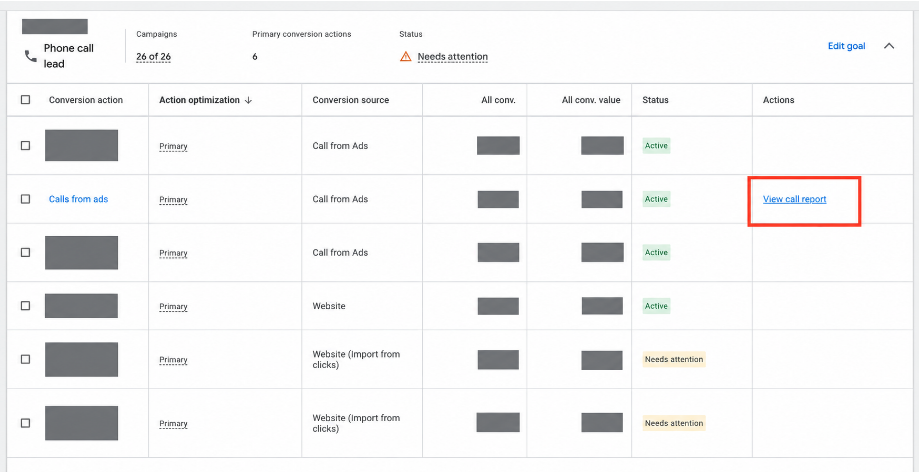
Google Ads put a View call report link next to phone-call conversion actions. I opened it.
It’s a faster path to data that was already in the account. It is not a call-tracking platform. It will not tell you whether the call was a job.
If you run home services, legal, or any business where the phone is the conversion, that distinction is the whole game. Smart Bidding will happily optimize to “the phone rang for 60 seconds.” Your P&L does not.
Where the link actually lives
Open the Phone call lead goal. In the conversion actions table, Calls from ads now has View call report in the Actions column. One click. You don’t have to build anything in the Report Editor.
That’s the change. Access, not capability.
What you get when you click it
The Call details report is a row-level log of calls that hit Google’s forwarding numbers. In the account we pulled, July 2026 showed 312 calls — start time, duration, area code, status, call type, campaign.
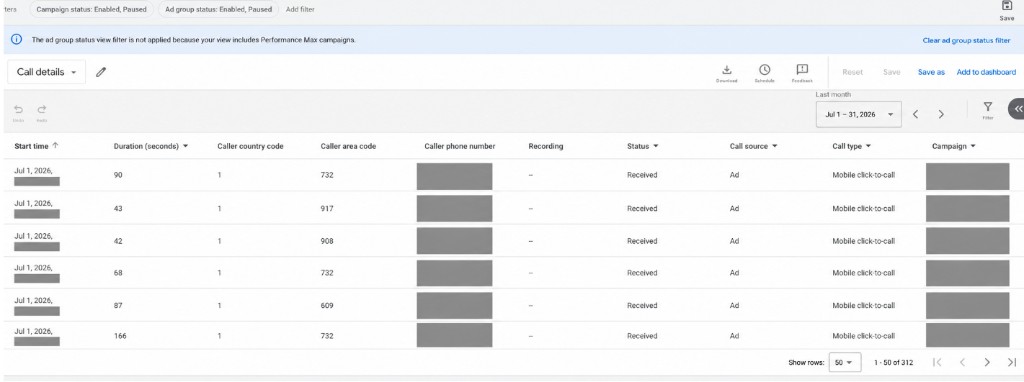
What I actually saw:
- Status: Received. Every visible row.
- Call source: Ad.
- Call type: Mobile click-to-call.
- Recording: dashes. Nothing to listen to.
- A banner at the top: the ad group status filter is not applied because the view includes Performance Max campaigns.
That last line is the tell. Native call reporting gets fuzzier exactly where more spend is going. PMax does not give you a clean ad-group story. The report still shows the call happened. It does not show you the path with the same resolution Search does.
Duration is useful. 42 seconds versus 166 seconds is a real difference. It is not a qualified lead. It is not a booked estimate. It is not revenue.
Calls and conversions are not the same number
This is the part that produces the Slack thread.
Google counts a phone call when the forwarding number receives the call. A phone-call conversion usually requires the call to meet the minimum duration you configured on that conversion action. Google also reports the call on the day it happened, and attributes the conversion to the day of the ad click.
So the totals will not match. That is often the system working as designed, not a broken tag. Same family of problem as GA4 versus Google Ads attribution: two numbers, two definitions, one argument that didn’t need to happen.
We saw a version of this in a home-services account: 367 calls in Google Ads, 349 inbound calls in the CRM, same month. The Call details report is the right place to start isolating that gap — dates, campaigns, missed versus received, durations that never crossed the conversion threshold. It cannot, by itself, tell you which of those 367 became a qualified lead, a booked job, or a dollar.
If the numbers are close, don’t celebrate yet. Close and true are different things.
Why we still use CallRail or Dial800
We use Google’s report to answer one question: did paid generate a call?
We use CallRail, Dial800, or the equivalent when the question becomes: was it a good lead, did the team handle it, and did it turn into revenue?
That’s recordings and transcriptions. That’s number insertion across more than Google. That’s routing. That’s the CRM write-back that lets you stop bidding on “the phone rang” and start bidding on booked work.
We’ve already seen what happens when that layer is wrong. A call-tracking tag firing on every page load. Nearly 11,000 conversions attributed to one user. Google Ads running Max Conversions on that signal. The algorithm did not pause to ask whether a customer picked up a phone. It scaled the mistake. We wrote that up in What Q1 2026 taught us about why marketing measurement breaks.
Google’s Call details report would not have caught that. It only sees calls that hit a Google forwarding number. A broken website call tag lives somewhere else — and that’s often where the expensive volume is.
What to do with it
Use the new link. It’s free, it’s in the account, and it saves you a trip through the Report Editor.
Then stop. Do not let Calls from ads become the conversion you treat as pipeline.
If you fix only one thing this week: look at what Google Ads is optimizing toward. If it’s a duration-threshold call from an ad extension, and your actual jobs start as website calls in Dial800 or CallRail that never come back as offline conversions, you are training the algorithm on the wrong phone.
The report tells you the ad generated a call. Your stack has to tell you what happened next.
Work with us
Need this done for your property?
Analytics Mates handles GA4 setup, GTM implementation, Looker Studio dashboards, and the ongoing measurement operations that agencies and in-house teams don't have bandwidth for.