
Your 2026 GA4 + AI Strategy Guide: What to Review, Fix, and Focus On
Every year, teams step back to review performance and set goals for the year ahead. That process hasn’t changed, but the tools and assumptions behind it have.
As we head into 2026, digital analytics looks different than it did even a year ago. GA4 has reached a point where most teams can rely on it for core reporting. Privacy constraints are clearer, even if they’re still evolving. And AI has become a practical layer or part in how we marketers analyze data, not an experiment on the side.
Together, these shifts change how year-end reviews tend to play out in practice. Instead of staring at dashboards and explaining numbers after the fact, teams now spend more time asking why performance moved in the first place and where effort actually paid off.
This post outlines how to review your 2025 GA4 performance, what’s worth fixing before the new year starts, and how to set more grounded goals for 2026 - using both GA4 data and the analytical support tools teams now rely on.
Why Planning for 2026 Feels Different
Planning for the year ahead has always started with reviewing what worked and what didn’t. What makes 2026 different is that teams are no longer limited to surface-level metrics when doing that review. GA4 has become stable enough to trust, and analytics data is clearer than it was even a year ago.
More importantly, teams are no longer guessing at the reasons behind performance changes. With AI helping analyze patterns across channels, audiences, and behavior, planning now includes an understanding of what actually drove results. Instead of reacting to dashboards, teams can focus on causes and trade-offs, which leads to more grounded goals for 2026.
Review Your 2025 Performance Using GA4 and AI Together
Before setting goals for 2026, it helps to be clear about what actually happened in 2025. GA4 gives you the baseline for that review, but reviewing performance today looks different than it did a year or two ago. Instead of pulling report after report and trying to connect the dots manually, teams can now use AI to help surface patterns once the data itself is trusted. GA4 shows what changed. AI helps you question why it may have changed and whether those patterns hold up under closer review. For more information on you can use AI with GA4 data, you can check out our blog post on How to Use AI to Get More Value from Your GA4 Data
1. Start with channel performance tied to key outcomes
Begin in GA4 by reviewing channel performance against your key events, overall traffic, and engagement. Here are the steps:
Step 1: Define your review window and key events
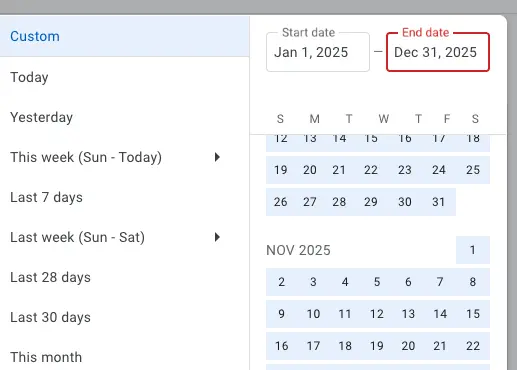
Set your GA4 date range to Jan 1 to Dec 31, 2025, or your full last 12 months.
*It would be good to also list your most important events.Primary conversions might include purchase, generate_lead, or book_consultation.Supporting events could include add_to_cart, begin_checkout, form_submit, or scroll.
Step 2: Export only the data you need
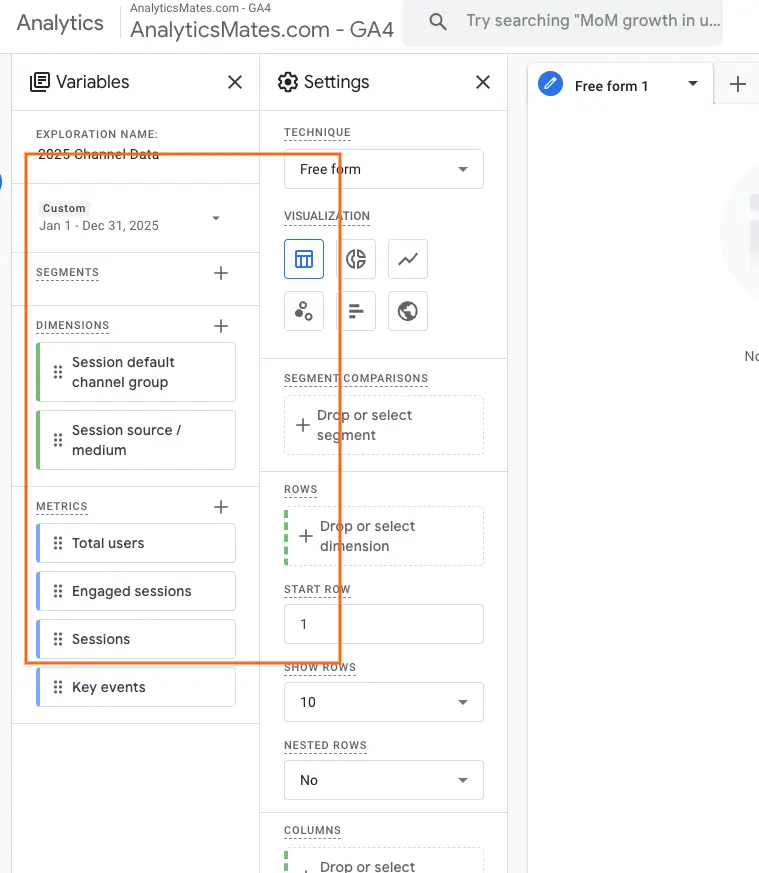
Instead of exporting everything, focus on small, targeted datasets that support analysis. But this all depends on what you need so most teams only need a small subset of data to answer meaningful questions. Explorations tend to work well here for most teams because they give you more control over what actually gets exported, instead of pulling data you never end up using.
Here are some examples of what exports should include:
Channel performance
- Report: Acquisition (Traffic acquisition)
- Dimensions: session default channel group, source, medium
- Metrics: sessions, users, engaged sessions, key events
Campaign and audience slices
- Add dimension: campaign or session campaign
- Optional: country or region
- Use age or gender only if your demographic data is reliable
Page engagement
- Report: Engagement (Pages and screens or Landing pages)
- Metrics: views, users, average engagement time, engagement rate, key events
Technology split
- Dimension: device category
- Optional: browser or operating system
Export each dataset as a CSV and name the files clearly, for example:
- ga4_2025_channels_raw_data.csv
- ga4_2025_pages_raw_data.csv
Step 3: Feed the exports into AI with clear instructions
Upload the CSV files to your AI tool and define expectations before analysis.
Ask for:
- A summary first
- Key drivers second
- Suggested actions last
Instruct the AI to flag uncertainty when data is missing and avoid inventing causes without evidence.
Example prompt:
“Review these GA4 exports for 2025. Summarize performance by channel, campaign, pages, and device. Identify the biggest changes over time, what likely drove them, and what should be prioritized for 2026. If a claim cannot be supported by the data provided, mark it as uncertain and explain what data would confirm it.”
This approach helps surface channels that brought in traffic without follow-through, alongside others that delivered fewer users but stronger outcomes over time.
2. Break down traffic acquisition by channel, campaign, and audience
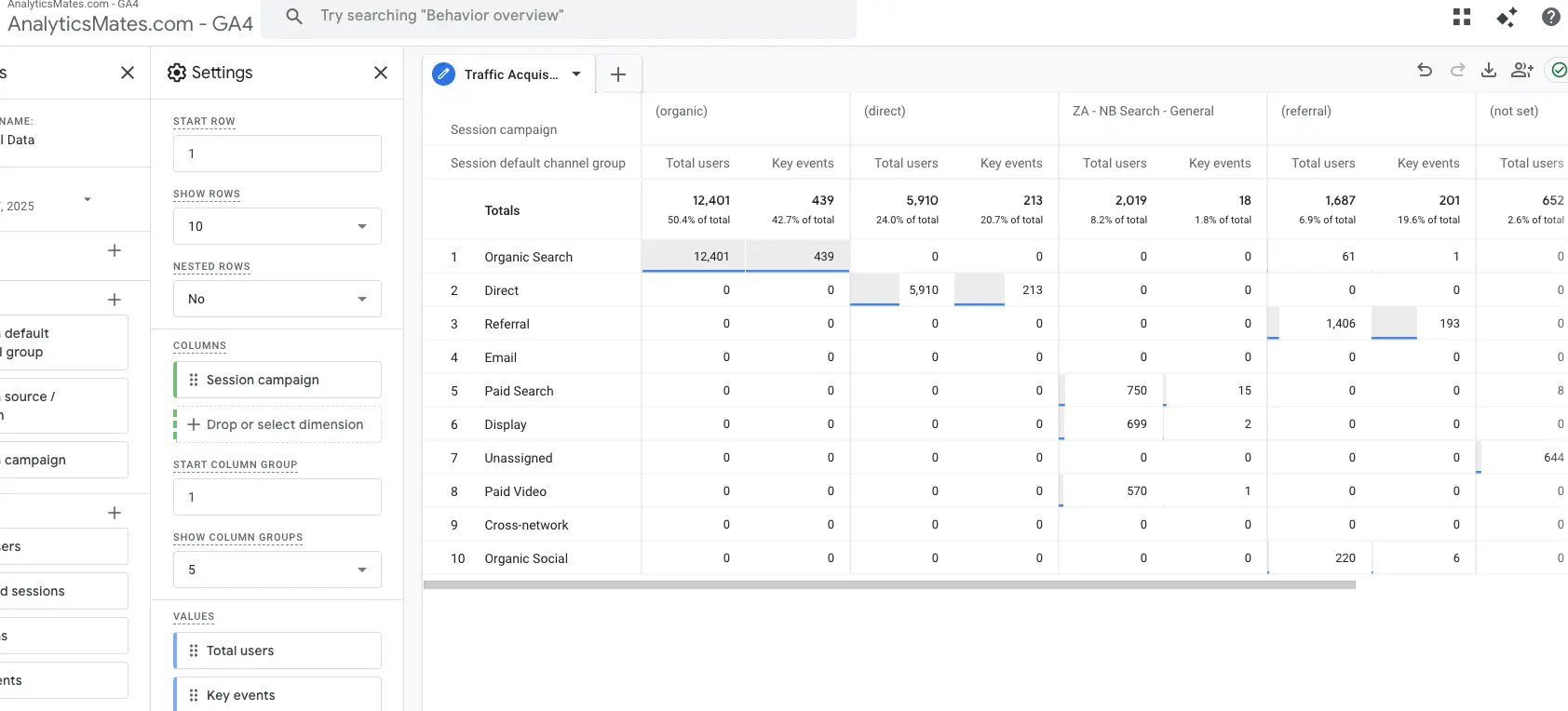
Next, move deeper into acquisition. In GA4, break each channel down by campaign and, where reliable, by demographic dimensions. This is often where intent issues appear.
You can export campaign-level performance or summarize what you see and pass it to AI. Ask AI to flag campaigns or audiences where traffic increased but engagement or conversions did not. These patterns often explain why top-line traffic looks healthy while results lag behind.
AI Prompt: Traffic Acquisition Analysis by Channel, Campaign, and Audience (GA4)
3. Review engagement across your most important pages
Once acquisition is clear, shift focus to engagement. Use the Pages and screens or Landing pages report to identify which pages received the most traffic and which held user attention.
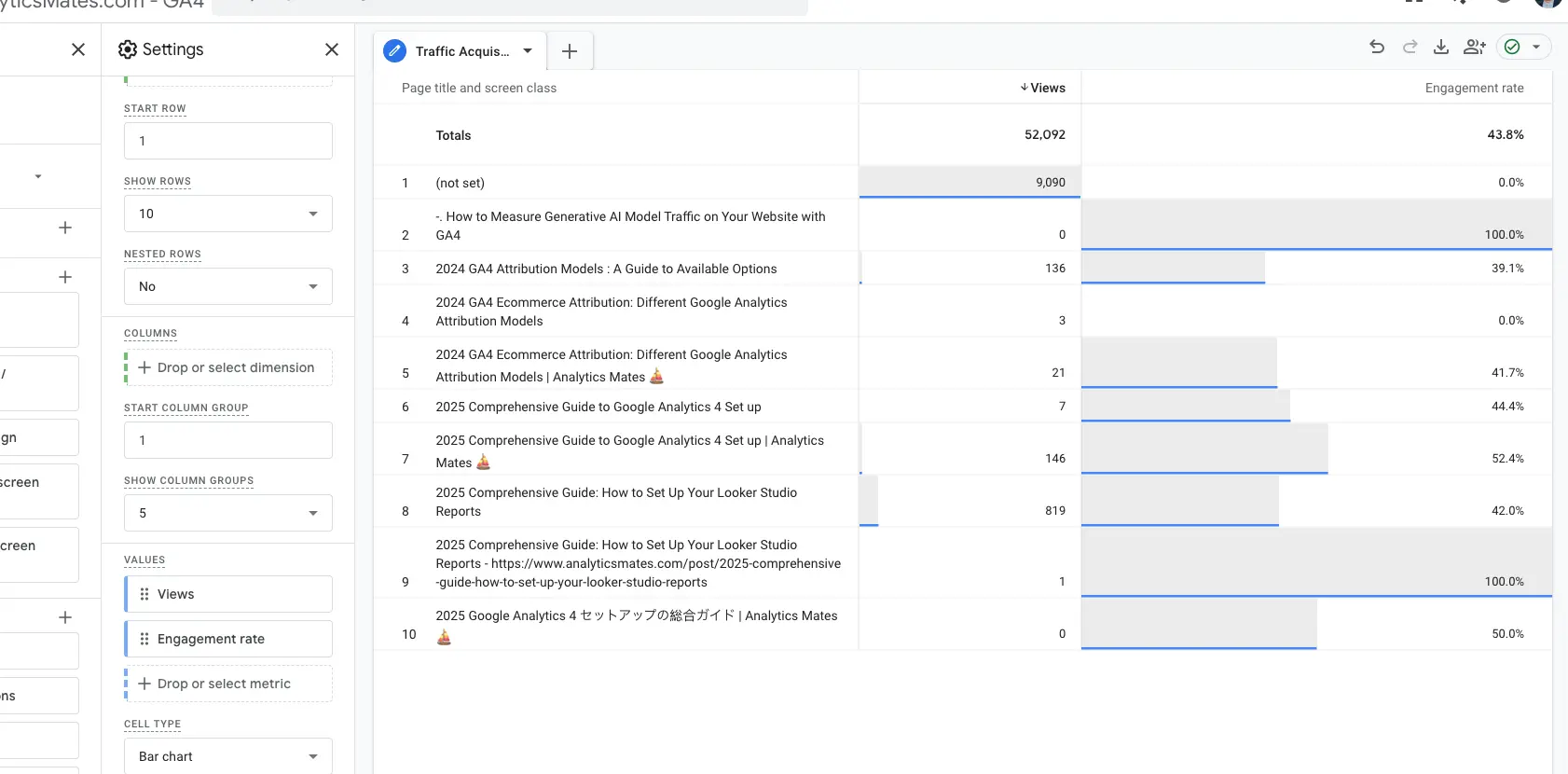
Export page-level engagement data or group pages by type before sharing it with AI. Ask it to identify patterns such as high-entry pages with low engagement or supporting pages that perform well but receive limited exposure. This helps prioritize where content or experience improvements are most likely to matter.
Example AI Prompt: Page-Level Engagement Analysis (GA4)
4. Evaluate conversion rate performance and drop-offs
From there, review conversion performance. Look at how conversion rates changed over time instead of focusing only on totals. Pay attention to where users dropped off and whether changes were gradual or tied to specific periods.
AI can help compare conversion paths across channels or devices and suggest likely causes when declines appear steady rather than sudden. Use GA4 to confirm those patterns before drawing conclusions.
Example AI prompt: Conversion rate analysis GA4
5. Validate overall tracking health before planning
After reviewing performance, step back and assess tracking health. Confirm that key events fired consistently throughout the year and that conversions were not duplicated or missing.
You can export monthly event counts and ask AI to flag anomalies or gaps. This step ensures you are not building plans on incomplete or misleading data.
Example AI prompt: GA4 Tracking Health and Event Consistency Check
For more information about how to properly set up event tracking you can check out our blog posts on this topic:
- Unlock Deeper Insights: Setting Up Custom Event Parameters in GA4 with GTM
- GA4 GTM Event Creation Techniques
6. Compare mobile and desktop behavior
Review performance by technology. Compare mobile and desktop engagement, conversion rates, and key paths inside GA4.
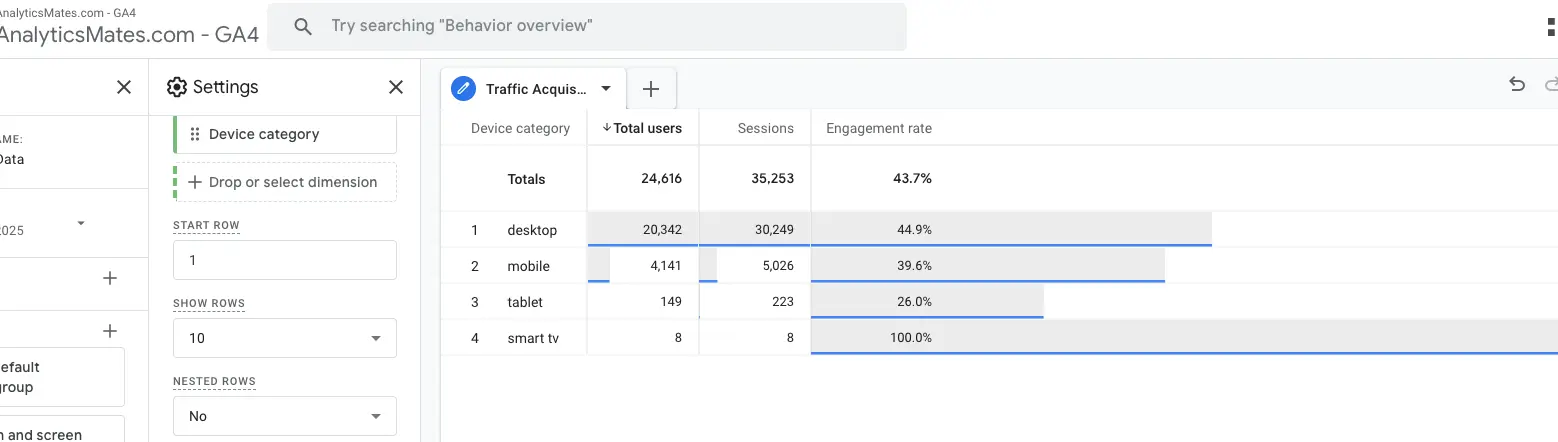
AI can help summarize these differences and highlight friction that affects only part of your audience. Even small gaps here can have an outsized impact on results.
GA4 provides the information on what changed in 2025, while AI helps explain what likely influenced those changes. This combination allows teams to plan for 2026 with clearer context, stronger evidence, and fewer assumptions.
Example AI Prompt: Mobile vs Desktop Performance Comparison (GA4)
Pay Attention to Metrics That Actually Influence Growth
Not every metric tells you much about what actually pushed results forward. When planning for 2026, the most useful metrics tend to be the ones that reflect intent and follow-through, not just activity. Things like repeated visits, time spent on key pages, CTA clicks without submission, or partial form interactions often show up before conversions change. These behaviors help explain where interest is forming and where momentum starts to slip, which makes them more useful than page views or session counts on their own.
The same thinking applies to channels and also content. Growth usually comes from users who stay engaged and eventually take action, not from traffic volume by itself. Some channels drive fewer users but better results, while others bring volume with little payoff. Paying attention to who comes back, what content people interact with, and who converts versus who leaves helps clarify where growth was supported in 2025 and where it slowed down.
Use AI to Understand the “Why” Behind Your Data
This is often the point where planning starts to feel less heavy. After reviewing what changed in your GA4 data, the harder part is making sense of it. You can scan reports and charts for a while, but it is easy to miss how different pieces relate to each other. AI helps here by giving you another way to look at the data, especially when the story is spread across reports that rarely get reviewed together. It will not always be right, but it can surface relationships you might otherwise miss when reviewing reports one at a time.
How to approach this step
Start with the GA4 exports you have already looked at, such as channels, audiences, funnels, or campaign results. The idea is not to bring in new data yet, but to work with what you already trust. When using AI, keep your questions tied closely to that data and avoid asking broad questions that are hard to validate.
This helps you point out questions around specific changes you noticed during your review. For example, you might focus on periods where performance slowed, segments that behaved differently than expected, or steps in the funnel where users regularly dropped off.
Example of prompts to try:
- “Why did conversions slow in Q3 compared to Q2 based on this GA4 data?”
- “Which audiences showed the strongest follow-through this year?”
- “Where do users most often drop out of the lead conversion or checkout flow?”
- “Which campaigns brought in users who converted later?”
Remember, the true purpose of what we’re doing here, is not to make AI decide for you, but to help bridge the gap between raw data and understanding. This will then eventually lead to a clearer context for your 2026 instead of some guesswork.
Turn Your Review into a Practical 2026 Action Plan
Once the review is complete, the next step is deciding what changes, if anything. This is where many reviews lose momentum. Insights get documented, shared, and then quietly set aside once the year picks up. Turning your GA4 and AI findings into a simple, repeatable plan helps keep that work relevant throughout 2026 instead of letting it fade after Q1. Here are some things to consider, but again, this is not all, it could vary depending on your business goals and plans.
1. Decide what to optimize
Start by identifying areas where intent was clear but results fell short. This often includes:
- Pages that attracted engaged users but did not convert
- Campaigns that brought qualified traffic but stalled later in the funnel
- Funnel steps where users consistently dropped off
These are usually the fastest opportunities for improvement.
2. Be clear about what to stop
Not everything deserves to carry forward into the new year. Use your review to call out:
- Channels that drove volume without meaningful outcomes
- Experiments that never showed traction
- Content or campaigns that no longer align with user behavior
Freeing up time and budget here makes room for better bets.
3. Define what to test next
Based on the patterns you saw, outline a short list of focused tests, such as:
- Improving messaging on high-intent pages
- Adjusting offers or CTAs for audiences that showed promise
- Simplifying paths where friction was obvious
4. Identify where to invest deeper
Double down on areas that showed consistent follow-through, even if volume was smaller. These are often where sustainable growth comes from.
AI can support this step by helping draft a starting roadmap. You might ask it to outline quarterly priorities or summarize improvements tied to your 2026 goals. From there, review, refine, and make the final calls yourself. The result is a practical action plan that stays connected to real performance and is easy to revisit as conditions change.
Example AI Prompt: 2026 Action Plan Drafting Using GA4 Data
But even with GA4 and AI working together, most teams still juggle exports, prompts, audits, and follow-ups. The process works, but it takes time and discipline to keep it consistent.
Where This Process Is Headed
Reviewing performance, asking better questions, and turning insight into action is the right approach for planning in 2026. The challenge is that doing this consistently still takes time, coordination, and discipline across tools and workflows.
That is the gap The Helm is being built to support.
The Helm is an AI-powered analytics assistant built by our team to support the parts of analysis that tend to slow teams down. It helps with audits, tracking checks, and making sense of performance shifts, but it does not replace judgment or decision-making.
We are opening early access to a limited group of users. If this planning process reflects how you already work, joining the waitlist gives you a chance to try The Helm early and help shape how it evolves.
Join the waitlist for early access to The Helm.
But like any new product, it is still evolving, and early access users help shape what it becomes.
FAQs
1. How much historical data do I need for a meaningful year-end GA4 review?
A full year is ideal, but even six months can reveal helpful patterns, especially if your traffic is consistent.
2. Is AI accurate enough to rely on for strategy planning?
AI is best used as a guide, not a final verdict. Use it to spot trends, ask better questions, and speed up analysis, but confirm major insights with your GA4 data.
3. What if my GA4 setup wasn’t perfect in 2025?
That’s normal. Use your review to identify gaps, fix event tracking, and improve your setup before the new year picks up momentum.
4. How do I know which channels deserve more budget in 2026?
Look at channel quality, retention, engagement, assisted conversions not just traffic volume. AI can also help surface patterns you might miss.
5. Should I reset my GA4 reports for 2026?
You don’t need to reset anything, but it’s a good time to clean dashboards, archive irrelevant reports, and rebuild views that better match your new goals.
6. Can AI help me detect tracking issues?
Yes. AI can analyze event patterns and alert you when something looks off, like sudden drops in conversions or missing events.
7. How often should I use AI for GA4 analysis?
Weekly check-ins work for most teams. AI helps you spot issues before they become costly.
8. Do I need additional tools besides GA4 and AI?
Not necessarily. Many insights come from a clean GA4 setup combined with an AI assistant. Additional tools are optional, depending on your workflow.
9. How do I present GA4 + AI findings to stakeholders?
Keep it simple: highlight trends, explain the “why,” and show the expected impact of recommended changes. AI can even help you draft these summaries.
10. Can AI help me predict what will matter in 2026?
While it can’t predict the future perfectly, AI can surface patterns that often point toward upcoming opportunities or risks.
Final Word
Planning for 2026 does not mean starting from zero. It starts with understanding how people actually used your site this year, where things worked, and where interest quietly dropped off. GA4 shows what happened, but it rarely explains why on its own. Taking the time to question patterns and look beyond headline numbers makes planning feel less reactive. You are not chasing perfect answers. You are building enough clarity to make decisions you can stand behind and adjust as the year unfolds.
Thank you for reading!
We’re always looking for ways to improve our Google Analytics 4 blog content. Please share your feedback so we can make it even better.
Work with us
Need this done for your property?
Analytics Mates handles GA4 setup, GTM implementation, Looker Studio dashboards, and the ongoing measurement operations that agencies and in-house teams don't have bandwidth for.