
The Missing Layer in Your GA4 Analysis: AI and MCP-Powered Insight Discovery

If you’ve been following our recent posts, you’ve probably noticed how each one builds on the last, from data cleanup, benchmarking, cost data import and now to data discovery. Once your GA4 setup is clean and other necessary settings are in place, the next step isn’t just to look at data and the numbers, it’s to identify what is hidden within those reports - possibly valuable information that you might be missing.
We’ll cover that in this blog post, because we don’t want you to stop at the reporting stage, thinking the job is done once the numbers are presented. But remember that the real magic happens when you start investigating the data behind those numbers. Here, we’re going to share how to leverage Google’s Model Context Protocol (MCP) server to help you move from simply tracking results to discovering new insights, hidden patterns, and smarter opportunities within your GA4 data.
Seeing Beyond the Numbers: Why Standard GA4 Reports Aren’t Enough
But wait before you go deeper, we assume you are already familiar with Google’s Model Context Protocol (MCP) by now, if not, you can check out our recent post about it.
Your GA4 data shows numbers that are important, but they only tell you what’s happening. What these reports don’t immediately show us is why it happened. And we believe that’s where the real opportunity lies.
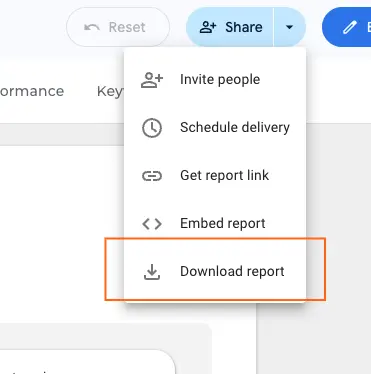
In order for us to give you real data, we can look at our site performance last week (October 19-25). This report derives from our Overall GA4 Performance Dashboard that you’re free to download.
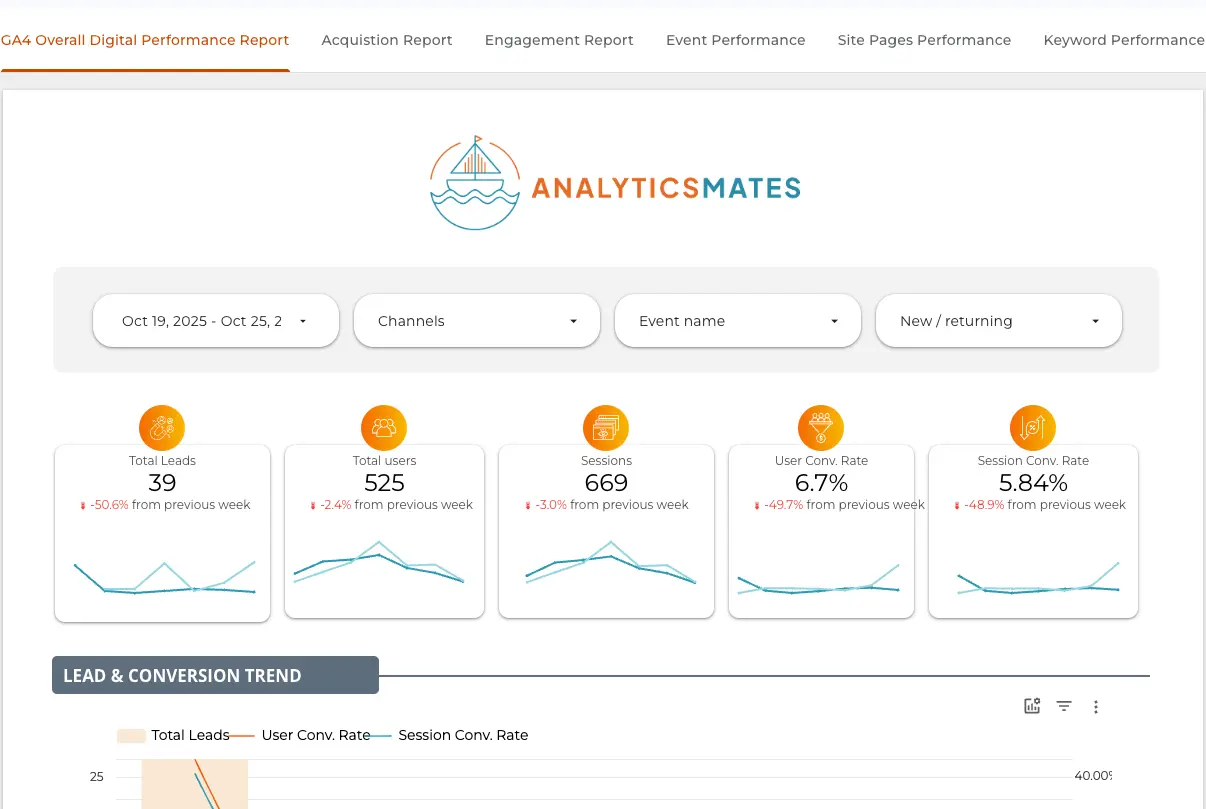
This number already tells a lot, data that can be turned into valuable insights. The trends and patterns reveal, at first glance, what’s happening and how your current traffic or engagement is performing during a specific period. We tend to only focus on what’s being shown, and often, marketers overlook or even ignore the deeper information within the data.
But, we’ll have to ask the question - can we still squeeze more information out of it, or did we miss something? We should think this way, in fact, it should be a common practice for everyone. It’s essential not only to understand what’s obvious but also to dig deeper and extract more meaningful insights. And that’s what we’re going to talk about in the next section.
Beyond the Dashboard: How AI Interprets What GA4 Can’t
For those who follow us in our past posts, you should be aware and familiar with the content we’ve shared about how we use AI to further analyze our data. Here are some of that posts:
- How to Use AI to Get More Value from Your GA4 Data
- How AI and GA4 Can Supercharge Your SEO Content Strategy
- Visualizing Google Analytics 4 Data: How AI Tools Enhance Your Reports
The whole idea here is straightforward, we combine GA4 reporting data with AI analysis and the goal is to go beyond the surface-level metrics and start uncovering the real stories behind your data.
These posts come with a set of AI prompts you can use to help analyze your GA4 data. We’ve shared specific prompts in each of our previous blog posts, but this time, we’ve created a new one that will change the way you think about reporting and help you uncover true insights.
Prompt:
Using the Google Analytics 4 data for [yourwebsite.com], what are some null hypotheses that can be developed beyond the standard reporting metrics? Please provide 5–10 hypothesis-based questions that marketers can use to uncover deeper insights and hidden patterns within their GA4 data.
Give it a try using our recent overall GA4 performance report here.
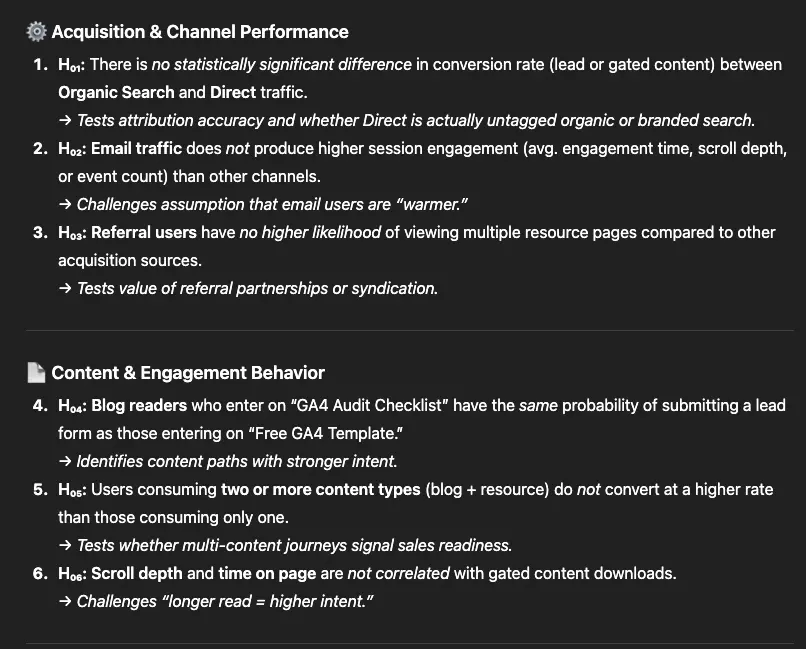
Questioning the Obvious: What Are Null Hypotheses and Why They Matter
In your GA4 report it is easy to take the numbers as absolute truths. But here’s the reality, data tells a story only if you ask the right questions. That’s why hypothesis / null hypothesis are important - they give your analysis structure and help you validate what your data is really saying.
Most marketers rely on dashboards to identify trends, spikes, or drops. But some insights can’t be spotted just by looking at graphs.
- Is a product performing better on weekdays than weekends?
- Do users convert more during specific hours of the day?
- Are returning users more likely to interact with gated content?
These are just a few of the kind of questions that standard dashboards won’t directly answer, but hypothesis testing can.
Using this prompt gives you a better chance to no longer have to build and test these hypotheses manually. AI tools can automatically generate possible hypotheses, run the analysis, and highlight patterns you might otherwise miss saving you hours of manual work and guesswork. This process becomes even easier once Google’s MCP Server is integrated into your GA4 account. There’s no need to jump from one platform to another — you can directly ask AI within the GA4 ecosystem to uncover insights that aren’t immediately visible in the numbers, patterns, and trends.
From Reports to Real Insights: A Simple Hypothesis Workflow
Here’s a simple workflow to help you get started.
1. Export your GA4 data → Start with your GA4 export or Looker Studio report to give AI the data it needs.
2. Feed it to AI or MCP → Use prompts to highlight correlations, anomalies, or surprising trends that aren’t obvious in your dashboards.
“What are some null hypotheses that can be developed beyond the standard reporting metrics?”

3. Validate insights → Cross-check engagement, conversion, or audience segments in GA4 to confirm the accuracy.
4. Document and act → Save your findings.
This forms a natural loop:
Data → Hypothesis → Testing → Action.
FAQs
Do I need technical skills to use MCP for GA4?
A: Not necessarily. Once your GA4 data is properly connected, you can use plain language prompts, no coding required.
Can AI really understand my GA4 data?
A: Yes, especially if you feed it structured exports (like CSV or Data Studio summaries). The clearer the input, the smarter the output.
What’s the difference between GA4 Insights and AI-generated hypotheses?
A: GA4 Insights highlight trends already in your data. AI-generated hypotheses explore hidden relationships or unexpected patterns.
How often should I generate new hypotheses?
A: Ideally once per month or per campaign cycle, to stay ahead of changes in audience behavior.
Is MCP available to everyone?
A: MCP (Model Context Protocol) is still rolling out gradually. You can use ChatGPT’s “MCP-like” behavior with structured prompts for now.
What if my GA4 setup isn’t clean or complete?
A: Start with a GA4 audit first. Garbage in, garbage out, clean data ensures reliable AI insights.
Can I automate this process weekly?
A: Yes, using GA4 API exports or scheduled Looker Studio dashboards that feed into AI prompts.
Conclusion
GA4 insights could be enough just by looking at the dashboards or numbers, but even the most detailed ones can miss the deeper story behind the data. They show what happened, not necessarily why it happened. That’s the reason we need GA4’s Model Context Protocol (MCP) help. We can partner with it to see beyond just the surface metrics, and it sounds cliche, but it will eventually turn patterns and anomalies into meaningful insights that guide smarter decisions. We hope at this point of the blog, we all can agree that GA4 reports with AI-driven discovery can move from simply tracking and monitoring performance to truly understanding it.
The real opportunity lies in curiosity too, we really need to ask the right questions, explore new angles, and test what your reports don’t show by default. When you use GA4 MCP to identify or uncover these hidden connections, you gain a clearer picture of your performance data long-term growth. So, don’t stop at reporting the numbers. So we’d like you to remember to start investigating the “why” behind your data through the help of GA4 MCP and you discover what your GA4 reports might be missing.
Thank you for reading!
We’re always looking for ways to improve our Google Analytics 4 blog content. Please share your feedback so we can make it even better.
Work with us
Need this done for your property?
Analytics Mates handles GA4 setup, GTM implementation, Looker Studio dashboards, and the ongoing measurement operations that agencies and in-house teams don't have bandwidth for.