
Set Up GA4 in 2026: How to Build a Measurement System You Can Trust
By now, most companies have GA4 installed. It’s collecting data and there’s the reports, but the truth is, a lot of us still don’t actually trust what we’re seeing. The numbers probably don’t quite line up. Conversions don’t feel right or off. Traffic looks strange. If we ask the question about how sure we are that the data in GA4 is reliable, we can all agree that we can’t be fully confident in the answer.
We last wrote a GA4 setup guide back in 2025, and a lot has changed since then. Not just in the interface, but in how GA4 is actually being used inside real businesses. In 2026, the problem is no longer “How do I set up GA4?” The real problem is quality. Reliability. Governance. And whether you can totally rely on your analytics setup to help you make decisions with confidence. This guide is about building a measurement system you can actually trust, not just getting a tag on the site or capturing custom events.
What You May Have Missed Since Your January 2025 GA4 Setup
Last year, we documented these shifts in our own 2025 GA4 updates guide. That post walks through what changed, why it matters, and what teams kept getting wrong in practice. Below is a quick snapshot of the most important updates the ones most teams tend to overlook.
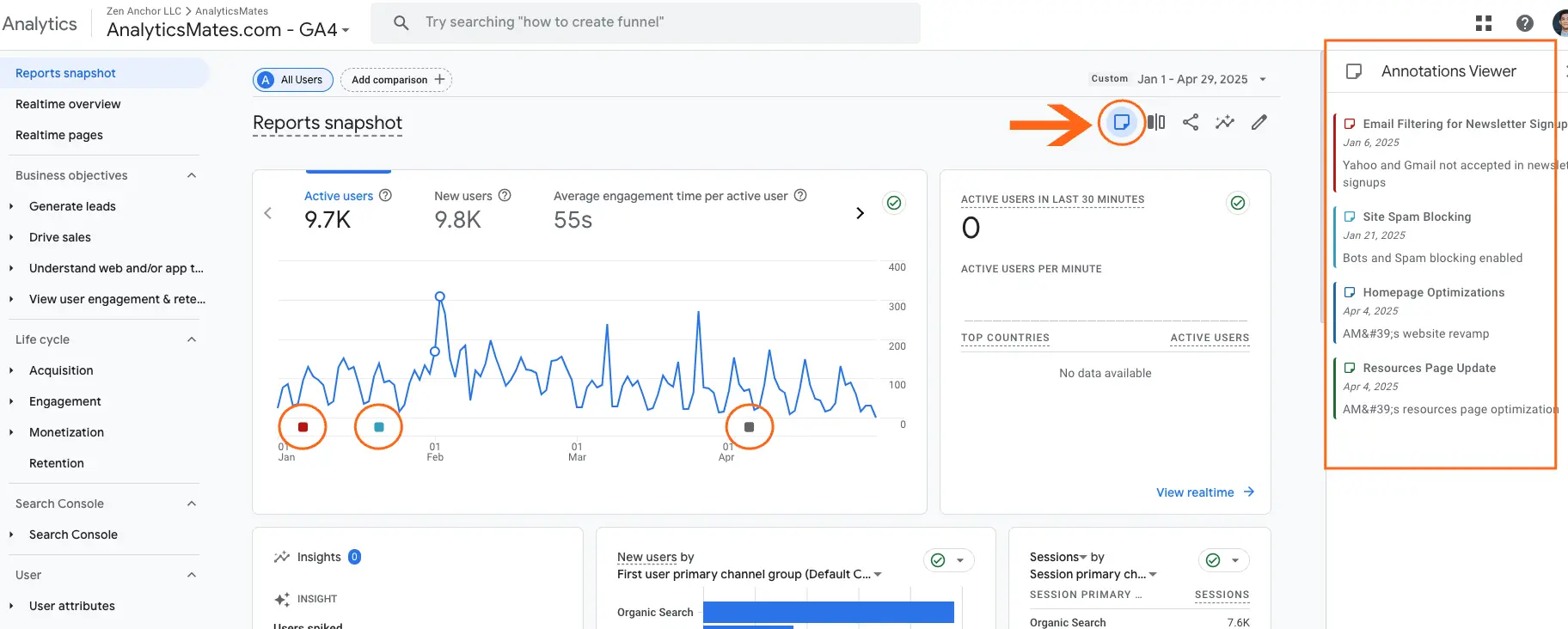
Annotations arrived in GA4
You can now add notes directly inside reports instead of keeping everything in Slack, Notion, or spreadsheets. This makes it much easier to connect data spikes or drops to real events like launches, outages, or campaign pushes. If you manage multiple stakeholders, this alone saves a lot of back-and-forth.
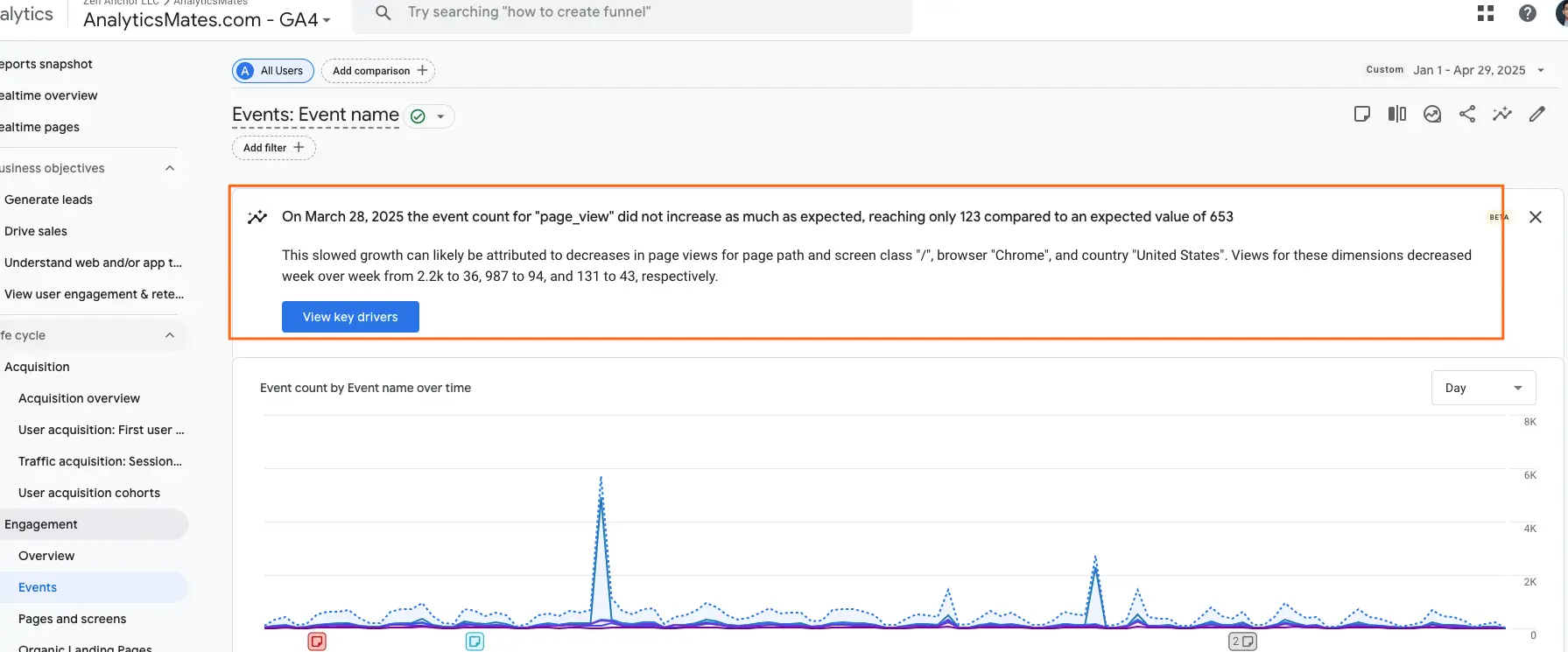
Generated insights showed up in more places
GA4 now surfaces automated insights inside standard reports, not just in the Insights hub. These can be helpful for spotting odd patterns quickly, but they are not a replacement for real analysis. They point you toward questions — they do not answer them for you.
Copying reports between properties became possible
If you manage multiple sites or clients, this was a big quality-of-life improvement. You can now reuse custom reports and explorations instead of rebuilding everything from scratch. The upside is more consistency across properties and fewer mistakes.
The rest of the updates you can download in our Resources section. It includes short summaries and practical takeaways you can actually use.
→Download the Top 20 2025 Updates
These changes hint at where GA4 is headed. To make sense of that, it helps to look briefly at what we’re seeing for 2026.
What’s Likely on Deck for 2026
Here’s how GA4 appears to be moving, based on what we’re already seeing in real accounts and real client work.
1. More built-in health checks including Google Analytics Advisor
Google is clearly pushing tools like Google Analytics Advisor as the first line of defense for data quality. It can flag obvious problems and surface questions teams might not think to ask. That’s helpful, but it won’t replace real governance. You still need someone who understands your business to decide what actually matters, what to ignore, and what requires deeper investigation.
2. Tighter guardrails on settings
GA4 seems to be adding clearer warnings when configuration changes could affect your data. In practice, this means fewer silent failures and more prompts that force teams to slow down and think before making changes.
3. Closer ties to CRMs and data warehouses
GA4 is gradually acting less like a standalone analytics tool and more like one piece of a larger data stack. Expect smoother handoffs between GA4, your CRM, and your data warehouse over time.
4. Less “traffic,” more outcomes
Reporting is shifting away from pageviews and sessions toward business results. The focus is moving from “how many people visited?” to “did this actually create value?”
5. Ongoing privacy changes
Consent, data retention, and cookieless measurement will keep evolving. Teams will need to revisit settings regularly instead of assuming they’re set once and done.
All of this points to the same reality: better tools don’t automatically create better data. That’s why the question in 2026 isn’t what GA4 can do, but what good GA4 actually looks like in practice.
What Good GA4 Looks Like Today
So I guess we’re good at skipping the actual GA4 setup. But we’re not totally ignoring that process because we know it’s important. We just want to shift our focus this 2026 to help users build a more reliable GA4 system. We believe that a strong implementation needs clear structure, ongoing quality assurance, and ownership. If no one is responsible for measurement, the setup slowly breaks down. Tags change, events get inconsistent, and data drift happens before anyone notices.
Good measurement requires active maintenance. It needs someone to watch for changes, validate accuracy, and own the outcomes. Features in GA4, like Anomaly detection or Analytics insights, directly point out suspicious behavior and data changes on your GA4 data. This is something that you can leverage.
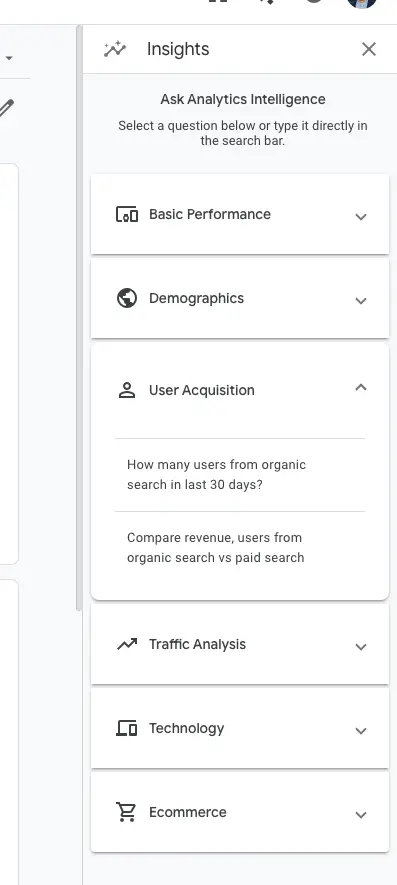
These features are useful, but they are limited. They often flag that something looks off, yet they rarely explain why it happened or what should be done about it. You still need human judgment, context, and deeper investigation to understand the real cause.
Google also offers Analytics Advisor, which is meant to use AI to surface potential issues and guide users toward answers. We previously wrote a simple comparison of how it works. While it can be useful in some cases, we still believe there are better tools that provide clearer direction and more practical support for teams. You can read more about it here.
The Foundation Still Matters
Like what we’ve mentioned above, we’re not totally ignoring the basics. They’re crucial to the entire process - so, account and property structure remains important. What has changed is how we think about it. In 2026 this setup is not just a short onboarding task. How we should think about it is that it becomes long-term data architecture you will live with for years. Decisions about structure affect reporting, integrations, and future scalability.
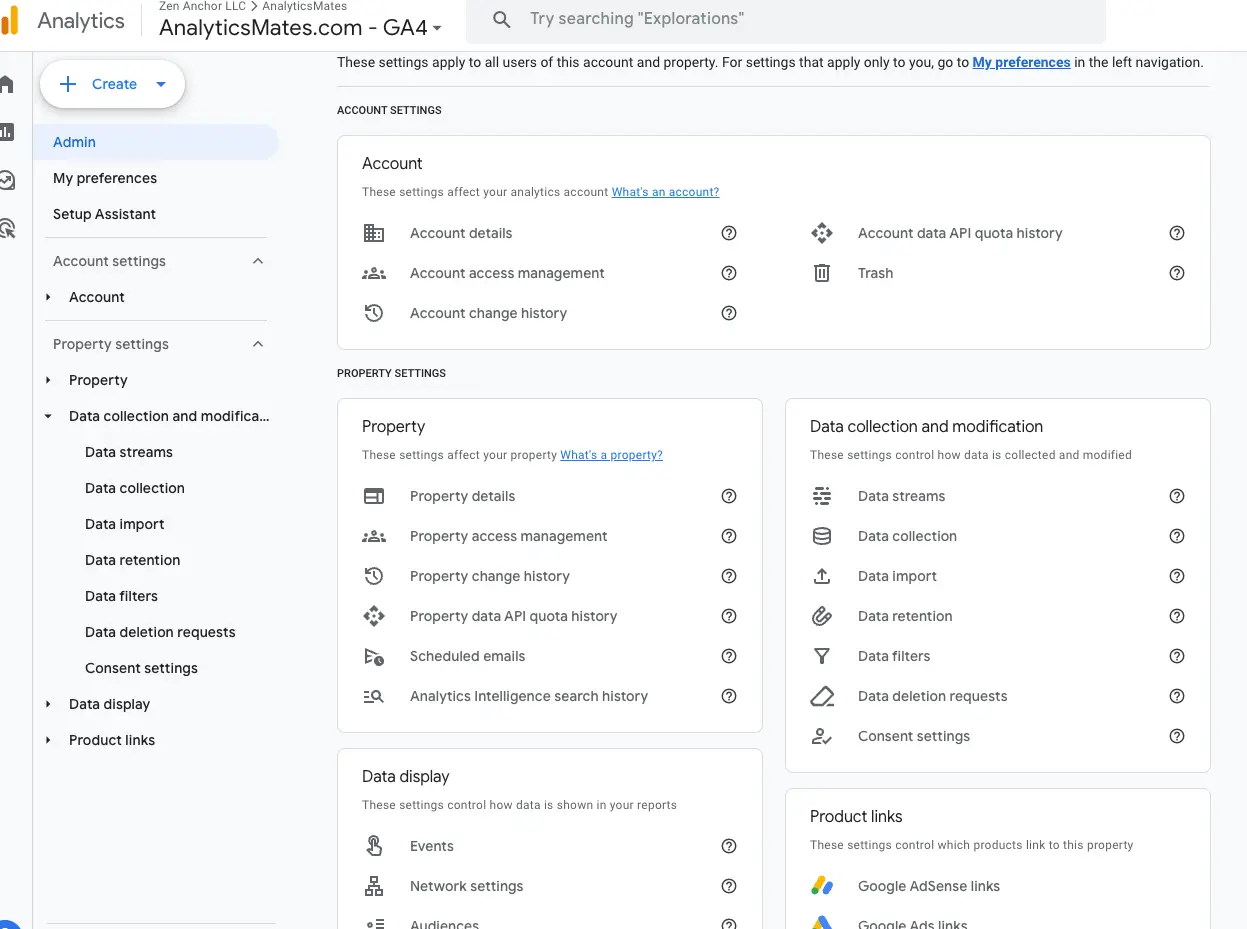
Most of us assume our GA4 setup is fine because we followed the official documentation. The problem is that those guides can be lengthy, and it is easy to miss important details in account and property settings along the way. Even small oversights can create bigger issues later.
One practical approach is to work from a checklist, including the audit checklists we have published on the Analytics Mates blog. These can help you systematically review your setup instead of relying on memory.
This gap is exactly why we built The Helm. One of its core features is continuous auditing, so you are not depending solely on one-time reviews or static checklists.
Data Collection Is a System, Not a Script

The next part is, how you collect data determines how much you can trust it. Google Tag Manager should act as your central control layer rather than an afterthought. Relying on plugins or hardcoded tags makes your setup hard to audit, could be prone to become faulty, and we can agree that it’s difficult to manage consistently.
That said, a centralized approach is easier to review and debug. You can see what is firing, why it is firing, and what data is being sent to GA4. That clarity makes your analytics more dependable. Watch out for our next blog post on how to set up Google Tag Manager in 2026.
Quality Assurance Is Continuous
Another important part of the we need to consider not just with the set up is quality assurance. If we ask ourselves the question. How are we actually doing this today? Testing in preview mode and fixing issues once is not enough. Analytics environments change over time. Pages change, new features are added, and integrations also evolve. Marketers and teams use ongoing quality checks to stay ahead of data issues. This type of monitoring is exactly the kind of work tools like The Helm are designed to help with, by automating checks and alerting you early on.
Default GA4 Does Not Understand Your Business
 in GA4 and Avoid Costly Mistakes.webp)
GA4 only provides basic traffic metrics - the default. It does not automatically capture your success metrics (KPIs). Pageviews, scrolls, and default events are just the starting point. To be valuable, you need defined key events, clear business logic, and shared definitions of success.
Without these, GA4 becomes little more than a dashboard of numbers that do not reflect real performance. Check out our previous post on how to properly identify and set up key events for your website.
Ownership, Privacy, and Configuration Sanity
Clear ownership of your GA4 setup is not optional. Settings like data retention, attribution configuration, PII protection, and integrations need to be checked regularly. Left alone, these settings can drift or break without anyone noticing. Continuous monitoring helps prevent issues before they cause real problems. All this is what The Helm offers to users, a tool which can track configuration changes that supports teams that cannot manually review everything themselves.
A New Operating Model for Analytics
Before we wrap this up, remember that the old approach was reactive. Set it up, hope it stays right, and discover problems too late. But in 2026, the modern model, we will become proactive. That is, measurement health requires continuous checks, ongoing QA, and iterative improvement. This philosophy is at the core of The Helm. It audits your implementation, monitors changes, explains what is wrong, and helps guide you on what to fix.
So, we can be confident with the technical setup of our Google Analytics 4, but the challenge now is building a dependable measurement system that provides reliable data you can trust. Viewing GA4 as infrastructure rather than a one-time project is essential.
Want This Without Constant Babysitting?
You could do all of this manually. Many teams try. But if you want dependable measurement without living in spreadsheets and checklists, The Helm provides oversight that works quietly in the background. Be among the first to try The Helm.
https://app.analyticsmates.com/
FAQs
1) How often should a GA4 setup be reviewed or audited?
A: At minimum, quarterly. In reality, any time you change the site, campaigns, or tracking, something can break.
2) Who should “own” GA4 inside a company?
A: There should be a clear owner. Not necessarily the person who clicks the buttons, but the person responsible for data quality and trust.
3) Is it normal for GA4 and other tools (like CRM or ad platforms) not to match exactly?
A: Yes. But big or growing gaps are usually a sign of tracking or configuration issues.
4) Can a “working” GA4 setup still be misleading?
A: Absolutely. Data can look fine while being quietly wrong or incomplete.
5) What’s the biggest risk in ignoring GA4 governance?
A: You end up making decisions based on data you shouldn’t trust, and you don’t realize it until much later.
6) Do small businesses really need this level of structure?
A: Yes. In fact, small teams feel bad data more because every decision matters more.
7) How long does it usually take for GA4 setups to drift or break?
A: Sometimes weeks. Sometimes months. It often happens without anyone noticing.
8) Is GTM required to do this properly?
A: Not strictly, but without it, governance and debugging become much harder.
Conclusion
GA4 in 2026 is not about learning where buttons are in the interface. It’s about whether your measurement system is something you can actually rely on when it matters. The companies that get the most value from analytics are not the ones with the fanciest dashboards. They’re the ones that treat measurement like infrastructure. Something that needs structure, ownership, and regular care.
If there’s one takeaway, it’s this: installing GA4 is easy. Keeping it trustworthy is the real work. Whether you manage that with a strong internal process, or with help from tools like The Helm, the important thing is to stop treating analytics as a one-time project. Your future decisions depend on it.
Thank you for reading!
We’re always looking for ways to improve our Google Analytics 4 blog content. Please share your feedback so we can make it even better.
Work with us
Need this done for your property?
Analytics Mates handles GA4 setup, GTM implementation, Looker Studio dashboards, and the ongoing measurement operations that agencies and in-house teams don't have bandwidth for.