
Google Search Console's Generative AI Reports Are Here. What They Show — and What They Still Miss
Google Search Console can now show how often your pages appear in AI Overviews, AI Mode, and generative AI features in Discover.
I opened ours. Performance → Generative AI. Three months: 7.93K impressions. Pages, countries, devices, dates.
No clicks. No CTR. No average position. No queries.
That is not a missing column waiting to load. That is the report.
Google announced the dedicated Search generative AI performance reports in June 2026 and finished the worldwide rollout on August 31, 2026. Until then, that visibility was folded into broader Search Console reporting. You could not separate it from classic blue-link search.
This is a real improvement. It is not a complete AI dashboard.
An impression here means a URL from your site showed up in a Google generative AI feature. It does not mean someone clicked. It does not mean they became a lead. It does not tell you whether ChatGPT, Perplexity, or Claude cited you.
Do not replace your AI visibility reporting with this. Add it as a layer.
We already wrote the rest of that stack: how to measure AI visibility in Bing, Search Console, and GA4, how we are responding to AI Overviews, and GA4’s AI Assistant channel. This post is the workflow for the new GSC report — what to read, what to ignore, and where it sits.
What the report actually shows
In Search Console: Performance → Generative AI (it still says Beta).
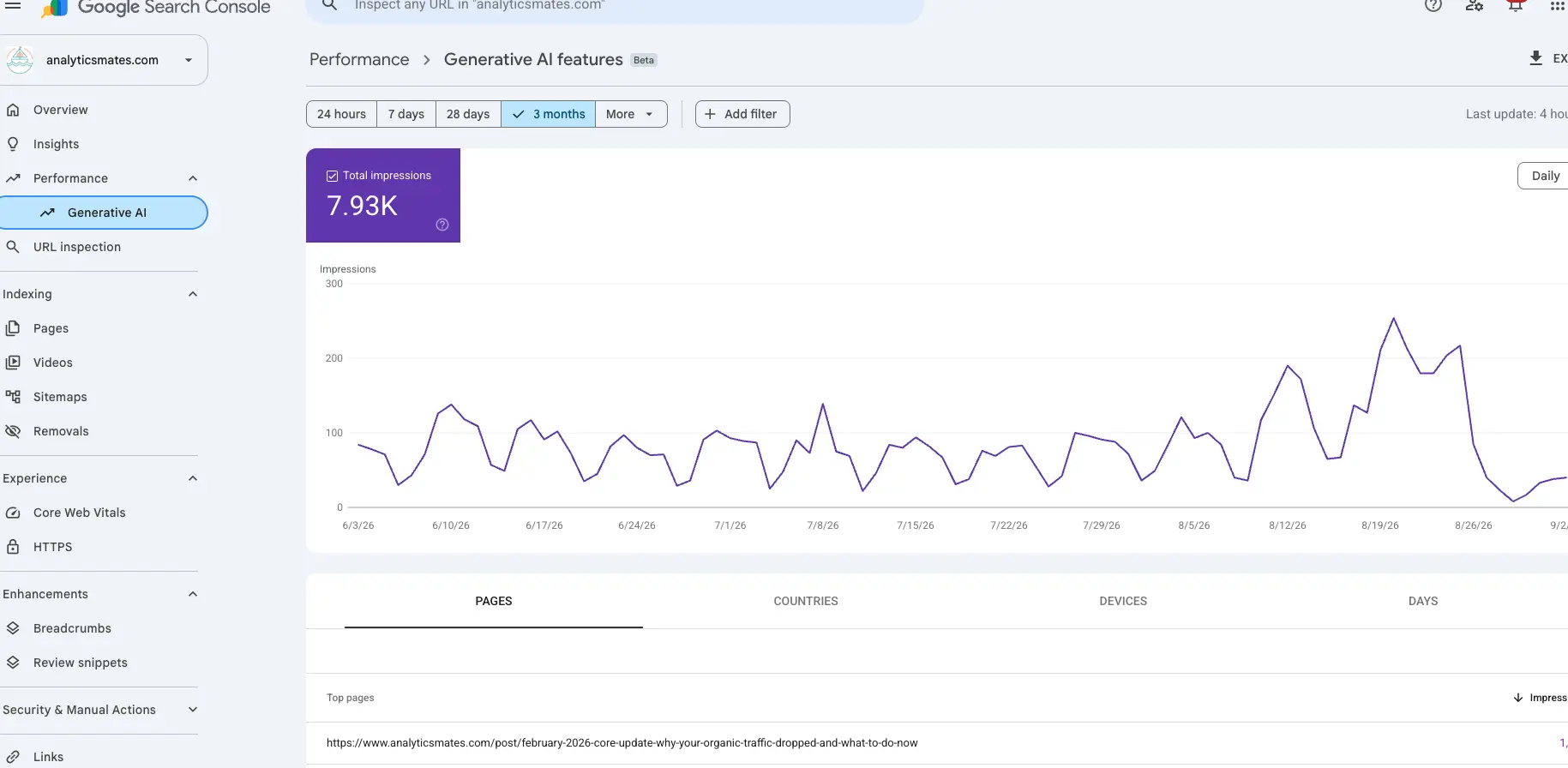
Google says it can show:
- Impressions — how often a URL from your site appeared in a generative AI feature
- Pages — which URLs received that visibility
- Countries — where it happened
- Devices — the device used when the page appeared
- Dates — hourly, daily, weekly, or monthly
That is enough to answer a question that used to be a guess: are we showing up in Google’s AI search experiences, and is that going up or down?
You will also see a banner on the standard Performance report: Get more details on your site’s performance in generative AI features on Google Search, with Open report. Same destination.
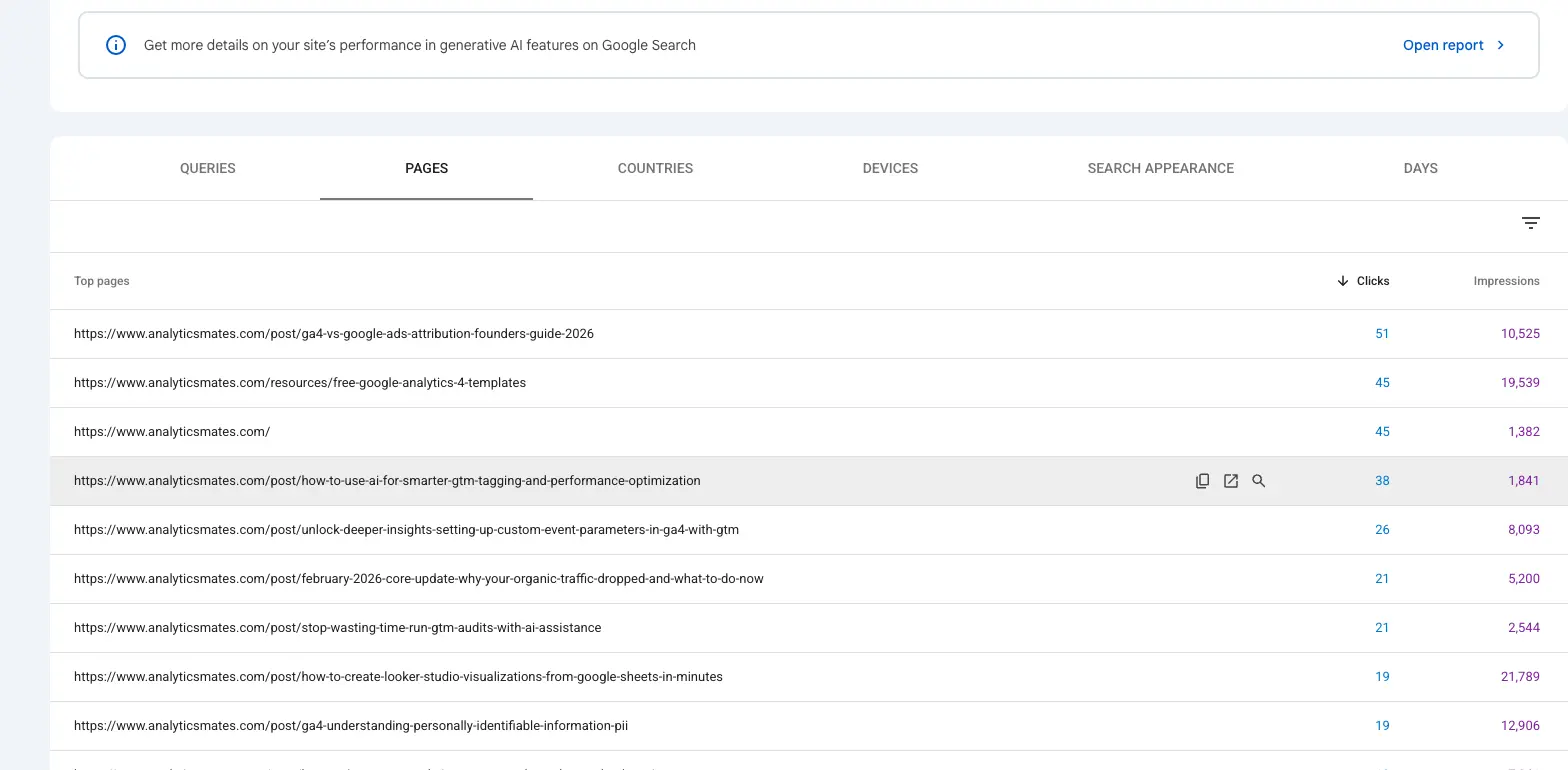
Keep both reports. The Pages table above still has clicks. The generative AI report does not. Mixing those two numbers into one “AI traffic” headline is how you lie to yourself.
AI search does not always behave like a blue link. A person can get the answer on the results page. Your site earns an impression and not a visit. Visibility and traffic have to be scored separately. We have been watching that on our own property: impressions up, clicks flat or down. That is not a reporting glitch. It is the behavior.
What it still will not answer
1. It does not show the journey after the impression.
Search Console is mostly what happens before the site. The report can tell you a page appeared. It cannot tell you whether the person engaged, viewed another page, submitted a form, called, or became a customer. That is GA4, call tracking, and the CRM.
2. It is Google’s generative features. Not the AI landscape.
No ChatGPT. No Perplexity. No Claude. No Copilot. Not Gemini as a standalone assistant, either. If this is your only AI report, you will understand Google AI visibility and miss everyone else.
3. An impression is not a click, and a click is not a conversion.
Exposure can still have value. Do not treat a rise in generative AI impressions as business impact. Read it next to engagement and outcomes.
4. Page-level data will not tell you why Google picked that URL.
You will not get the query, the prompt, how prominently you were cited, or which competitors sat next to you. For that you still need manual review, a prompt set you run on a schedule, or a third-party visibility tool. Treat those as directional. They are not a ranking report.
Where Search Console fits — four layers
The useful move is to stop hunting for one “AI number.” Put the sources side by side.
Layer 1 — Visibility in Google generative AI
Source: Search Console Generative AI performance report.
Impressions, pages, country, device, trend. AI Overviews, AI Mode, and the Discover generative features Google includes.
This layer answers: where is our content appearing in Google’s AI search experiences?
Layer 2 — AI-referred website traffic
Source: GA4 (or the analytics tool you actually trust).
Sessions and users by identifiable AI referral. Landing pages. Engagement. Key events. Assisted journeys if you have them.
Not every AI-influenced visit will be labeled. Some will show as Direct or Organic Search because the referrer is missing, or the visit started inside a Google search experience that never sent a clean source.
On our property, a Free form exploration of Session default channel group = AI Assistant is the other half of the GSC screenshot. Gemini, ChatGPT, Perplexity, Claude as ai-assistant. That table has sessions, engagement, and key events. Search Console’s generative AI report does not.
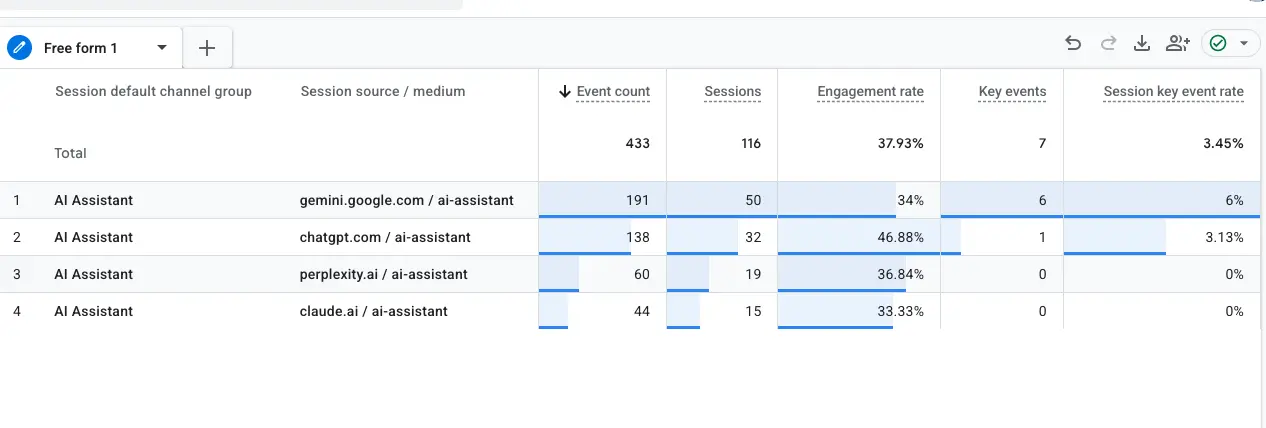
This layer answers: which identifiable AI platforms sent people to the site, and what did those visitors do?
Layer 3 — Mentions, citations, and answer visibility
Traffic reports only capture visits. They do not show a mention with no click.
Run a consistent prompt set, or use a specialized AI visibility platform, and look at brand mentions, cited URLs, competitor inclusion, and whether the answer is accurate. Results move with model, location, personalization, and date. Directional. Not a trophy.
This layer answers: when someone asks a relevant question, are we in the answer?
Layer 4 — Leads, pipeline, and revenue
This is where the report either becomes an operation or stays a slide.
Connect identifiable visits to the CRM, the booking system, ecommerce, or offline conversion import. Leads. Qualified opportunities. Booked jobs. Purchases. Assisted conversions. Landing pages that show up later in the path.
This layer answers: did AI discovery contribute to an outcome the business would recognize?
If forms, calls, and CRM writes are broken, layer 4 is fiction. Layers 1–3 will still look fine. That is the same measurement failure we see on paid: the platform is scoring the wrong moment. Detect, fix, verify — then remember what you checked. A visibility report on top of a broken conversion path is not a strategy.
A practical monthly read
You do not need to force every source into one metric. A useful monthly view is four rows:
| Reporting area | Primary source | What to review |
|---|---|---|
| Google AI visibility | Search Console | Impressions, pages, country, device, trend |
| AI-referred visits | GA4 | Sessions, landing pages, engagement, key events |
| Mentions and citations | Prompt set or a third-party tool | Brand inclusion, cited URLs, competitors, answer accuracy |
| Business outcomes | CRM, ecommerce, call tracking, offline conversions | Leads, qualified opportunities, bookings, purchases |
The goal is not one definitive “AI traffic” number. The goal is to see how AI systems expose the brand, whether that exposure becomes a visit, and whether that visit becomes something that pays.
What to do with it this week
- Write down the baseline. First available month of generative AI impressions, plus the pages receiving them. You need a reference before you argue about the next one.
- Add the report. Do not replace the others. Keep classic organic Performance and AI-referral reporting. Put generative AI in its own section so visibility, traffic, and conversions stay separate.
- Look at the pages. Guides, product pages, comparisons, specific customer questions? Use the pattern to inform content. Do not assume the correlation is the reason Google picked them.
- Check whether layer 4 can even be true. Key events, forms, calls, ecommerce, CRM. If those are not collecting, the new GSC report cannot tell you whether AI is working. It can only tell you that you appeared.
- Keep doing the unfashionable SEO work. Google says there are no special technical requirements for AI Overviews or AI Mode beyond being indexed and eligible to appear in Search with a snippet. Crawlable pages. Useful original content. Clear internal linking. Page experience. Accurate structured data where it belongs. Do not trade that for an “AI optimization” hack.
If you fix only one thing: stop reading generative AI impressions as if they were clicks.
Search Console finally shows whether your pages are appearing in Google’s AI experiences. Website analytics show what identifiable visitors do. Citation monitoring shows how other models talk about you. CRM and revenue data show whether any of it mattered.
Together that is an honest report. Any single dashboard that claims to be the whole story is not.
If you want this as a reporting operation — GSC generative AI, GA4 AI referrals, and the conversion path that proves impact — book a consultation.
Keep reading
- February 2026 Core Update: Why Your Organic Traffic Dropped and What to Do Now
Organic traffic dropped after the February 2026 Core Update? This guide explains what core updates really do, why rankings fluctuate, and how to audit your site using GA4 and Search Console. Learn how to identify weak pages, align search intent, and strengthen your SEO strategy.
- How to Measure AI Visibility Using Bing Webmaster Tools, Google Search Console, and GA4
Measure AI visibility the right way. Learn how to track AI citations in Bing Webmaster Tools, compare rankings in Google Search Console, and validate real impact in GA4. Discover how to identify ranking pages with no conversions and turn visibility into measurable business results.
- Who Really Won the 2026 Super Bowl Ads? It Depends When You Look
Update (Wednesday, Feb 11 at 11am ET): This post reflects live Google Trends data across 15 Super Bowl advertisers, tracked at 4-hour intervals over a 7-day window (43 data points per brand). Learn more.
Work with us
Need this done for your property?
Analytics Mates handles GA4 setup, GTM implementation, Looker Studio dashboards, and the ongoing measurement operations that agencies and in-house teams don't have bandwidth for.