

A few years ago, Google Tag Manager was often treated like a simple deployment tool, a place where marketers dropped snippets of code so they didn’t have to bother developers. For many teams, once GTM was “installed,” the job felt done. But if you’ve worked in analytics for any length of time, you know how that story usually ends. Containers overtime become messy, tags pile up, and at some point you realize that your reports don’t really match reality anymore. We shared this in our legacy post on Google Tag Manager Setup 2025: Step-by-Step Guide.
In 2026, that mindset no longer works. Google Analytics is only as reliable as the data feeding into it, and most of that data is controlled inside Google Tag Manager. What used to be a technical utility has quietly become the backbone of your entire measurement system. In this post, we look at how that shift is changing the way teams should think about GTM from firing tags to controlling measurement.
Why GTM matters more than ever
You can build beautiful dashboards, create elegant Looker Studio reports, and design sophisticated audiences in GA4, but if your tags are inconsistent or broken, those insights will still be misleading. In practice, most data quality issues trace back to Google Tag Manager, not GA4.
That reality has become clearer in 2026 for three reasons:
1) First, data is more fragile than before.

With privacy changes, cookie restrictions, and consent rules, you no longer have unlimited, clean behavioral data. Every tag matters more because you have less margin for error. If your implementation is sloppy, the impact on reporting is bigger than it used to be.
2) GA4 depends heavily on events.

Universal Analytics leaned on pageviews. GA4 runs on events. That means GTM isn’t just “sending data” anymore it is shaping how your entire analytics model works. Your event names, parameters, and timing determine what you can analyze later.
3) GTM now sits at the center of more tools.

In many organizations, GTM doesn’t just serve GA4. It also manages pixels for Google Ads, Meta, LinkedIn, TikTok, email tools, heatmaps, and server-side tagging. When GTM breaks, everything breaks.
So in 2026, GTM is less about quickly deploying tags and more about making sure your measurement system is structured, reliable, and aligned with your business goals.
The reality most teams face
We often assume that Google Tag Manager setup is “done” simply because tags are firing. We don’t pause to ask whether the container is actually healthy. But one thing is for sure, over time, GTM tends to grow and become messy like conversion tags here, a new event there, a last-minute tracking addition before a campaign launch. We don’t think there’s someone who really designs the system; it just evolves. And this is where the problem starts, duplicate tags appear, old scripts still , variables get reused in confusing ways, and event names lose any clear logic. What began as a simple tracking setup slowly turns into something difficult to understand, maintain, or trust.
A pattern we see again and again in audits is that the original analyst set up GA4 properly, but over the next couple of years multiple people touched the container, each adding their own approach without cleaning up what came before. We wrote a blog post on How to Audit Your Google Tag Management Set Up, which would help marketers audit their GTM setup to prevent containers looking more like patchworks than structured systems.
And the truth is technical problems are only half the story. What we normally observe is the documentation is often missing, which means no one can clearly explain why certain tags exist or what they were meant to do in the first place. When the original owner leaves, that context disappears with them.
How teams should approach GTM in 2026
The biggest shift is mindset. Instead of looking at Google Tag Manager like a utility, we should start treating it like a product that requires care and ownership. That means running regular audits rather than waiting for something to break.
Also it’s important that making decisions about new tags and events to track should start with business questions, not tracking requests. Remember this, when you have to choose, it’s better to track fewer things accurately than many things poorly. And practicing good documentation makes it much easier for your team to keep your GTM container healthy in the long run.
Where tools like The Helm fit in
You can manually review GTM, but it is slow, repetitive, and easy to miss things. That is why we came up with this blog post: Stop Wasting Time: Run GTM Audits with AI Assistance so users can audit their site leveraging the help of LLMs or AI agents/tools. Currently we’re working on a way to do this inside The Helm. At this point we’re just making sure we have the right components and resources to ensure that we can deliver the best possible audit experience for users. That doesn’t mean you can’t use it, it has a feature to scan your site and suggests events that your site is missing.
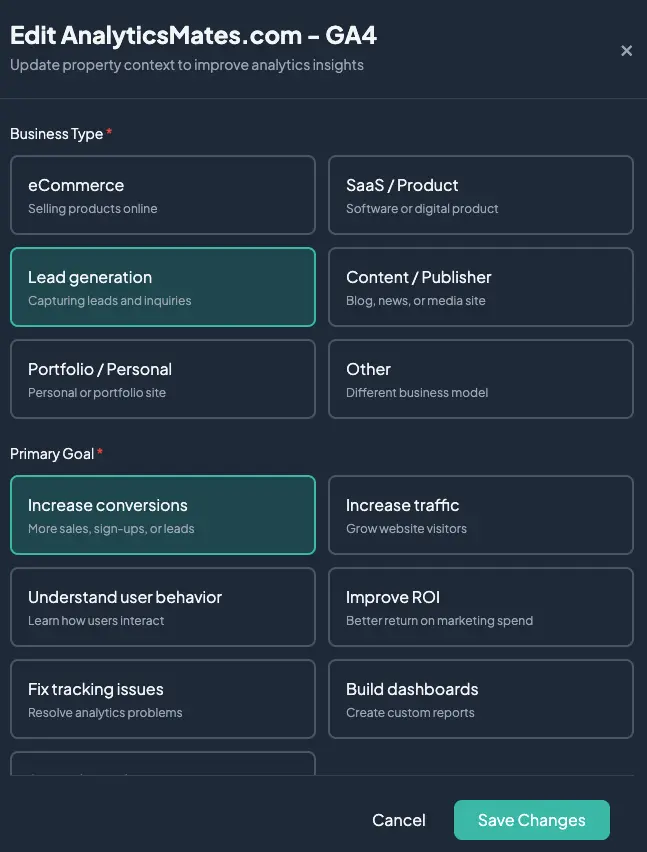
Currently, we’ve been building a similar feature inside The Helm. Right now we’re focused on getting the right foundations in place, like the checks, rules, and logic that make an automated Google Tag Manager audit genuinely useful rather than just surface-level. You don’t have to wait for that work to be finished, though. The Helm already includes a site scan that highlights missing or weak events →
.webp)
based on your business industry (SaaS, Lead Generation, Ecommerce, etc.) so you can start getting value from it today while we continue refining the experience.
The shift from deployment to governance
In the past, success often meant simply getting a tag to fire and that still matters. Nothing in this update is meant to dismiss the technical foundation you built in earlier guides. That work is still important and crucial for the entire process. The difference is that in 2026, “it fires” is no longer a sufficient standard. The more important question is whether your measurement can actually be trusted, especially that GTM has shifted from being mainly a deployment tool to acting as a governance layer for your data, which means structure, shared standards, and regular oversight now matter more than quick fixes and last-minute updates.
FAQs
How often should a team audit their GTM container?
A: At minimum, twice a year. If your site changes frequently, every quarter is better. You should also do a lightweight check after any major site update, new marketing tool installation, or GA4 change. Think of it like a health check, not a full forensic investigation every time.
Who should actually own GTM - marketing, analytics, or engineering?
A: Ideally, analytics owns the strategy and standards, while engineering supports implementation when code is needed. Marketing shouldn’t be making changes alone, and developers shouldn’t be making decisions about what to track. The best setup is analytics as the gatekeeper, with developers as collaborators.
What’s the first thing to clean up in a messy container?
A: Start with duplicates. Remove or disable redundant tags first, especially old Universal Analytics tags. This usually delivers the biggest immediate improvement in data quality with the least effort.
How do you decide what to delete vs keep in GTM?
A: If you can’t clearly explain why a tag exists or what decision it supports, it’s a strong candidate for removal. Also delete anything tied to deprecated tools, test experiments that ended, or tags that haven’t fired in months.
Should every event in GA4 come from GTM?
A: Not necessarily. Core website interactions usually should, but server-side events, CRM events, or app data may come from other systems. The key is consistency - don’t mix methods randomly without a plan.
How do you prevent duplicate events in the future?
A: Create a simple event taxonomy and stick to it. Before adding any new tag, check if something similar already exists. Also, document new events in a shared spreadsheet or Notion page so the team has one source of truth.
What’s a simple naming convention that actually works?
A: Use clear, human-readable names like:
- GA4 | Click | Primary CTA
- GA4 | Form | Submit
- Meta | Pageview
Avoid internal jargon, abbreviations, or developer-style naming that only one person understands.
How do you document GTM without creating massive overhead?
A: Keep it lightweight. A single spreadsheet with:
-
Tag name
-
Purpose
-
Where it fires
-
Owner
-
Last reviewed date
-
That’s usually enough. Don’t over-engineer documentation nobody will read.
When should you involve developers vs handling changes yourself?
A: Use developers when you need custom JavaScript, data layer changes, or server-side work. If it’s just triggers, variables, or standard tags, analytics should handle it directly in GTM.
How can you tell if your GTM setup is actually healthy?
A: A healthy container has:
- No duplicate tags
- Clear naming you can understand at a glance
- Few (not many) tags doing meaningful work
- Events that align cleanly with GA4 reports
- Evidence of recent review rather than years of neglect
If you can open your container and immediately feel confused, it’s probably not healthy.
Conclusion
Google Tag Manager has gradually become one of the most important parts of your analytics setup. In 2026, it’s no longer just a place to create tags, custom events and datalayer, it’s the backbone of how you measure your organization’s performance. So if you haven’t looked closely at your container in a while, haven’t done any audit too, that’s a good place to start. You can review it manually or use LLMs and even try The Helm to surface problems more quickly, but the real shift is mindset: treat GTM as a living system that needs regular attention, not something you configured once and forgot about.
Thank you for reading!
We’re always looking for ways to improve our Google Analytics 4 blog content. Please share your feedback so we can make it even better.
Work with us
Need this done for your property?
Analytics Mates handles GA4 setup, GTM implementation, Looker Studio dashboards, and the ongoing measurement operations that agencies and in-house teams don't have bandwidth for.