
Black Friday 2026: How to Improve Conversion Tracking with First-Party Data, Google Data Manager, and Meta CAPI
In our previous article, Black Friday 2026: What’s New in GA4, GTM, and Marketing Measurement, we covered recent updates to analytics and conversion tracking ahead of the holiday shopping season. A few more developments are worth discussing, especially Data Manager in Google Analytics and the Google Data Manager API, plus Meta Conversions API (CAPI). We’ll also look at how businesses can use first-party customer data with these tools to send conversion information back to their advertising platforms.
Let’s say a customer completes a purchase on your website, but that purchase doesn’t appear in Google Ads or Meta Ads. It could be a browser restriction or a consent setting. Other times, the problem comes down to how the purchase event was configured or what information was sent. We’ll go through what these tools can do, how you can set them up, and how to check whether conversions are being recorded correctly before Black Friday.
Understanding first-party data and its role in Black Friday campaigns
What is first-party data?
First-party data is information you collect directly from customers or people who interact with your website. That can include purchase history, customer account details, email addresses submitted through forms, and products added to a shopping cart.
Let’s say a customer visits the website during a Black Friday sale and purchases a pair of shoes for $100. The store records the order, including the transaction ID, purchase amount, products purchased, and date of purchase. All of this is first-party data because the store collected it directly from that specific transaction.
GA4 might also record that purchase through a tracking event. But what if the event doesn’t fire or the purchase amount is incorrect? The store still has the original transaction record, which can be used to check whether the information reported in GA4 matches the actual sale.
Why first-party data matters for conversion measurement
We use tools like GA4, GTM, and advertising pixels to track website activity. Those tools don’t always capture every conversion. Some visitors decline tracking consent. Browser restrictions or technical issues can prevent events from being recorded.
For example, your online store might process 150 orders during Black Friday, but GA4 only reports 132 purchases. That doesn’t always mean something is broken. You’ll need to check whether consent settings, missing events, or tracking errors explain the gap.
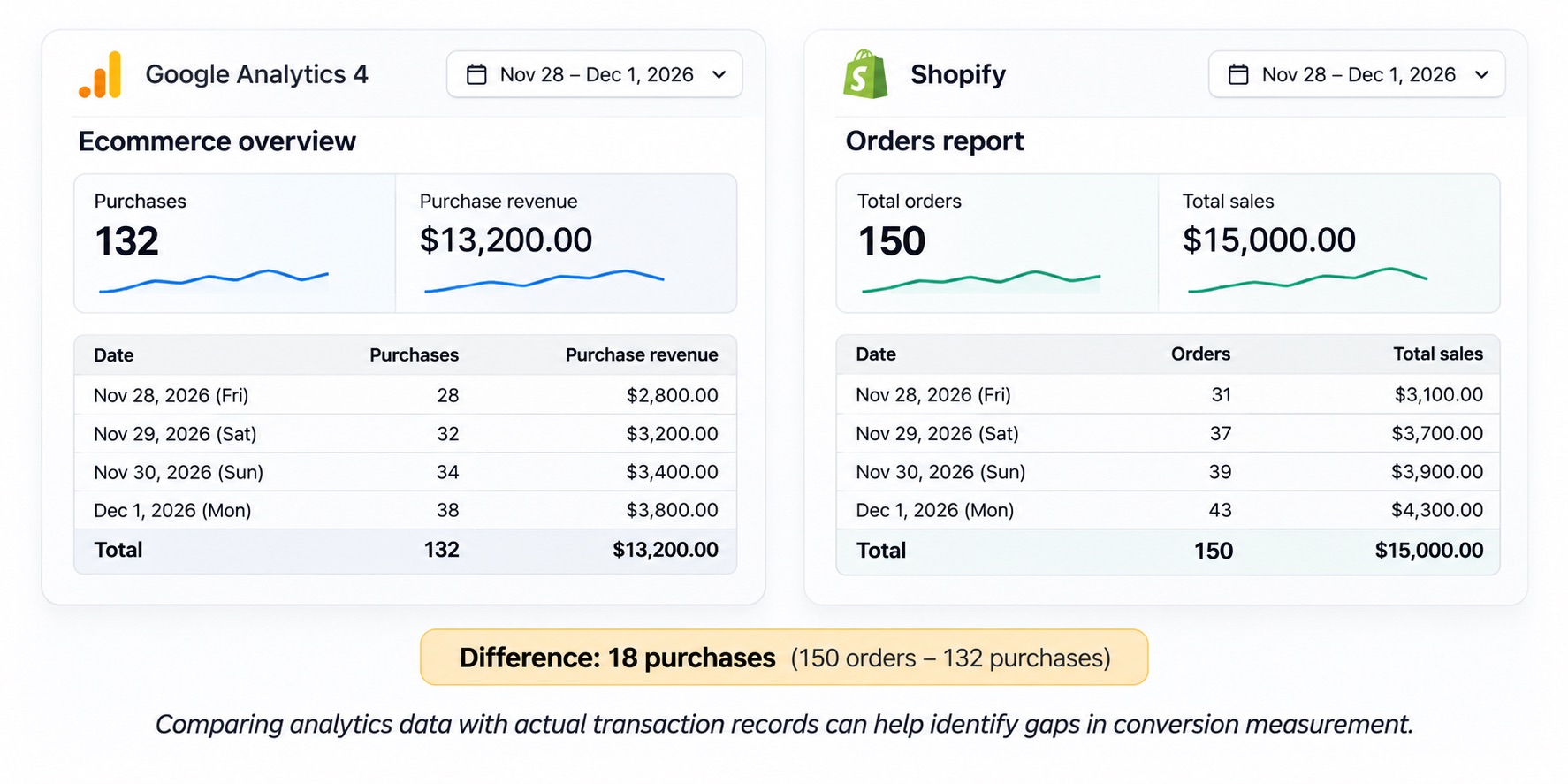
Illustrative example: comparing analytics purchases with actual order records can help identify gaps in conversion measurement.
This is where first-party data becomes useful. By comparing your actual order records with what’s reported in GA4, you can identify missing or incorrect conversion data. Those records can also be used with supported integrations to send eligible conversion information back to advertising platforms like Google Ads and Meta Ads. You still need to follow applicable privacy requirements and respect customer consent when collecting and sharing this information.
Once you’ve checked that your conversion data is accurate, you can also use our Black Friday Benchmarks page to put your campaign performance into perspective. It provides reference points for reviewing your own Black Friday results.
Using Google Data Manager and its API to improve conversion tracking
What is Data Manager in Google Analytics?
On November 6, 2026, Google introduced Data Manager in Google Analytics as a beta. It sits in the GA4 Admin console and gives you a central place to review data streams, connected products, first-party data connections, and connection diagnostics.
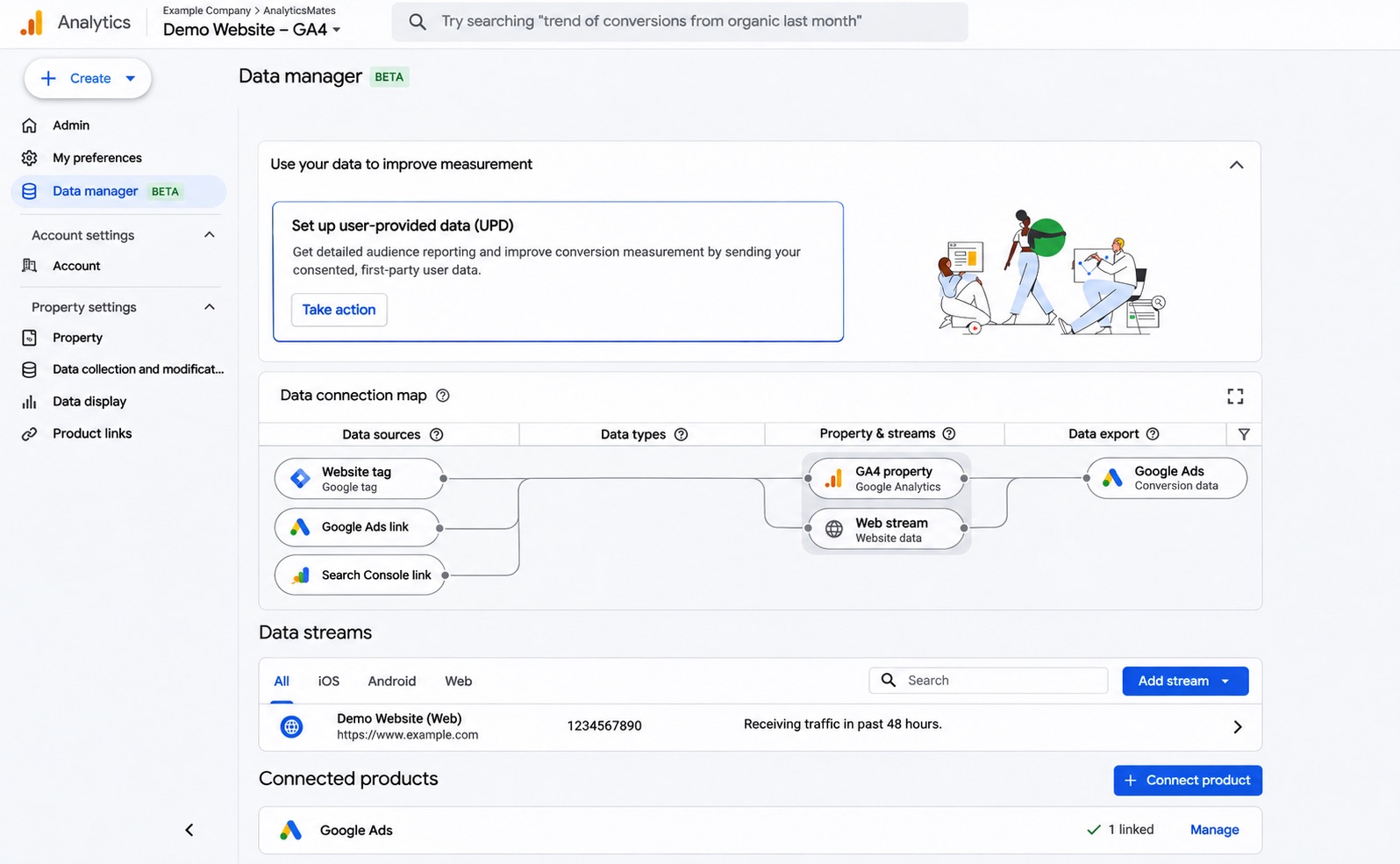
For businesses preparing for Black Friday, this is a practical place to review existing data connections before campaigns go live. If you’ve recently updated your website or made changes to your Google Ads integration, you can use Data Manager to check whether the expected connections are still in place.
Google also warns that data ingested through Data Manager in Google Analytics flows downstream to linked Google Ads and Google Marketing Platform accounts — not the other way around. Don’t activate an identical data pipeline in both interfaces, or conversions can be counted twice.
You can then use GA4’s DebugView and reporting tools to test whether purchase events, transaction values, and other important details are being recorded correctly. With more traffic and purchases expected during Black Friday, checking your setup in advance gives you time to investigate tracking issues before they affect campaign reporting.
What is the Google Data Manager API?
Google also has a separate Data Manager API for developers. The GA4 Data Manager interface helps users manage supported data connections. The API is a different surface: it lets businesses automate eligible first-party data workflows, including sending supported conversion information to Google Ads.
This can be particularly useful during Black Friday when customers don’t always complete their purchases directly on the website.
For example, a customer clicks your Black Friday Google Ad and submits an inquiry about a product or service. They don’t purchase immediately, but your sales team follows up and closes the sale a few days later. Since the transaction happens outside the website, it may not be captured by your usual website conversion tracking.
If your CRM stores the required conversion information, a supported Data Manager API integration can send that confirmed sale back to Google Ads. That helps you evaluate which Black Friday campaigns are generating actual sales, rather than relying only on the number of inquiries received.
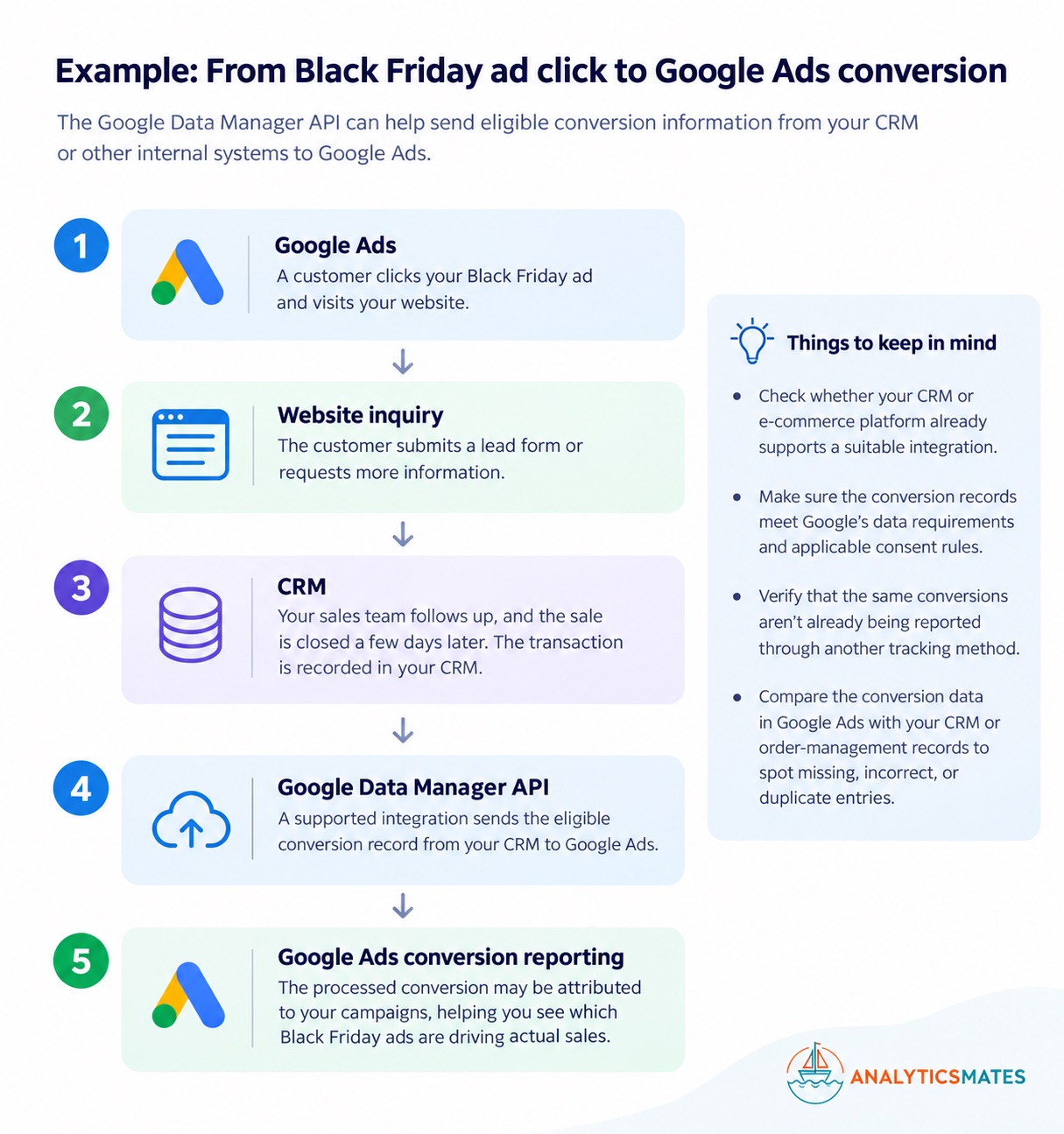
Not every business needs a custom API connection. If your e-commerce platform or CRM already supports a suitable integration, that may be easier to maintain. You’ll also want to check Google’s data requirements, applicable consent requirements, and whether the same conversions are already being reported through another tracking method.
Using Meta Conversions API for Black Friday tracking
What is Meta Conversions API?
If you’re running Black Friday campaigns on Facebook or Instagram, you’re probably already using the Meta Pixel to track website activity such as product views, add-to-cart actions, and purchases.
Meta Conversions API (CAPI) provides another way to send eligible conversion events to Meta through a server or supported integration. This can help improve measurement when browser-based tracking is limited, although it doesn’t guarantee that every missing conversion will be recovered.
For Black Friday, this is particularly useful when you’re expecting more purchases and want advertising reports to reflect the transactions your store is actually receiving.
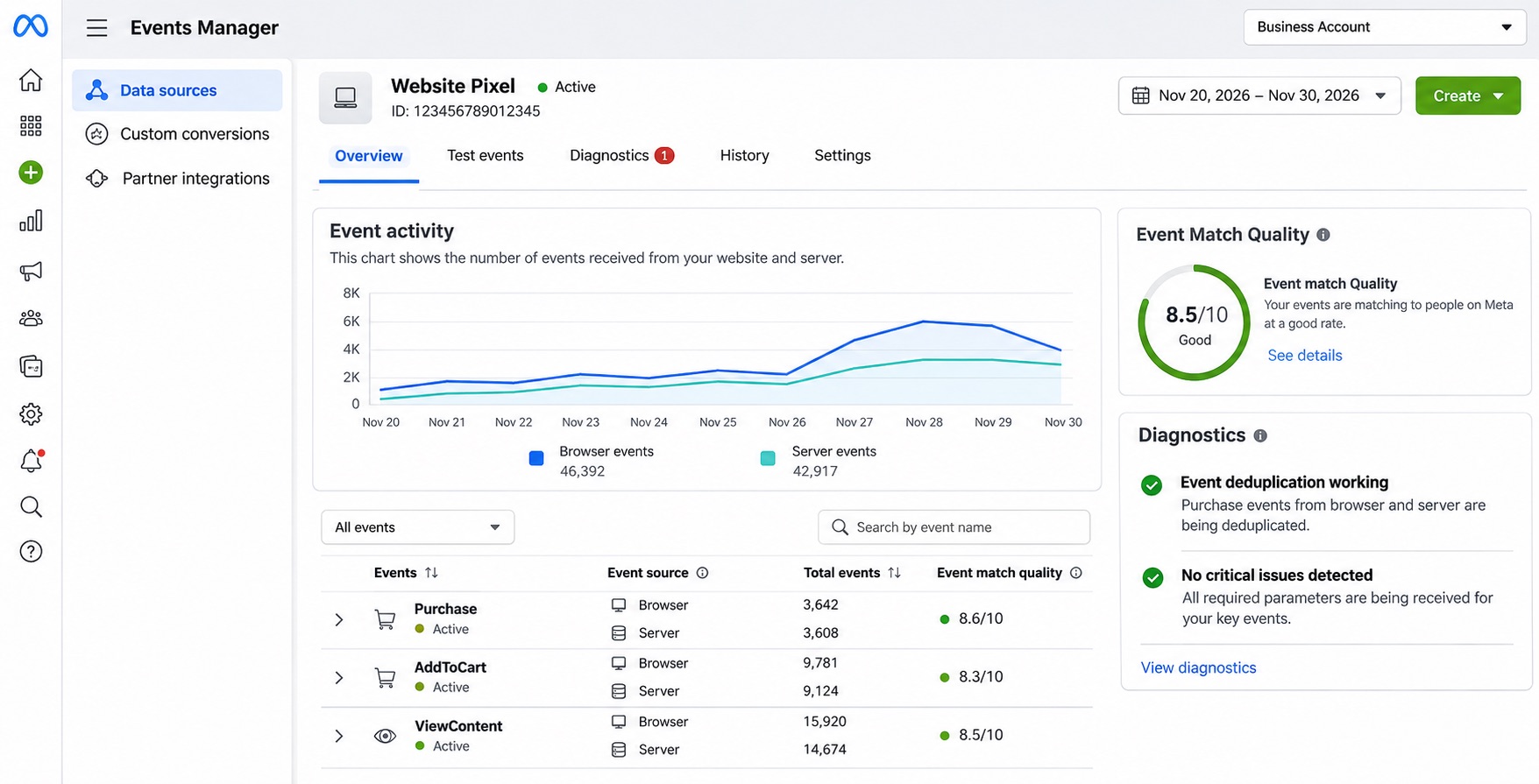
Why use Meta Pixel and CAPI together?
Let’s say a customer clicks your Black Friday promotion on Instagram and purchases a product for $120.
Your website sends a Purchase event through the Meta Pixel, while your e-commerce system also sends the confirmed transaction through CAPI. Both events refer to the same purchase, so Meta needs a way to recognize that they shouldn’t be counted twice.
This is called event deduplication. When the Pixel and CAPI send the same purchase, they should use matching event names and event IDs so Meta can identify them as the same transaction.
Without proper deduplication, you could end up reporting more purchases than your store actually received, which can also affect your reported return on ad spend.
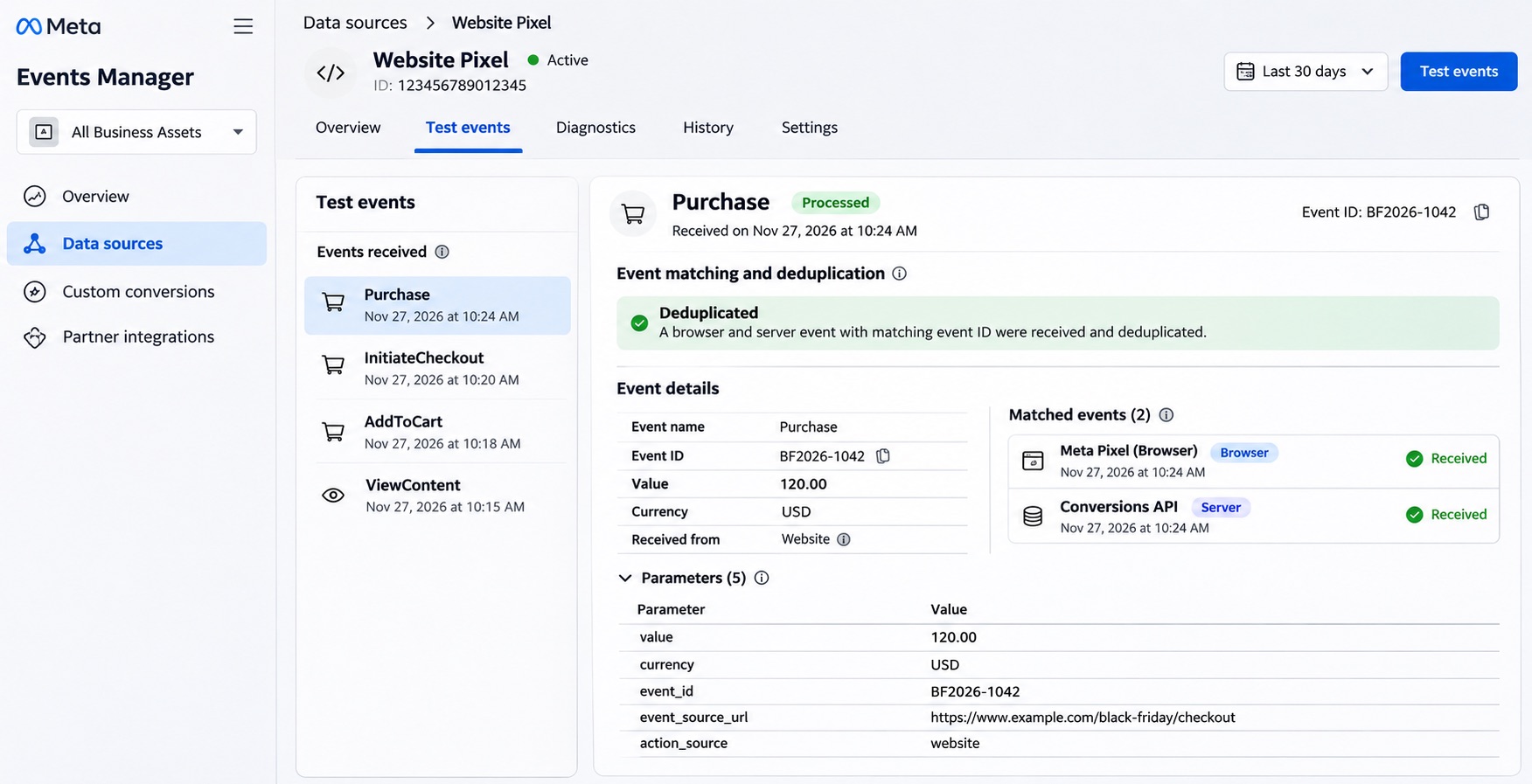
What should you check before Black Friday?
Before launching your campaigns, review your Purchase events in Meta Events Manager. Check whether browser and server events are being received, whether deduplication is working, and whether the purchase values match your actual order records.
This is especially important during Black Friday when discounts and promotional codes can affect transaction values. For example, if a customer pays $120 after a discount but Meta receives a purchase value of $150, your reported revenue may be overstated.
If you’re considering CAPI, check whether your e-commerce platform already offers a supported integration before building a custom connection. You’ll also need to follow applicable privacy and consent requirements when sending customer information.
For setup instructions and technical requirements, refer to Meta’s official Conversions API documentation. We also have a longer walkthrough in Your Meta Pixel Isn’t Enough: A Practical Guide to the Conversions API.
Improving conversion data accuracy before Black Friday
Even with GA4, Google Ads, and Meta tracking configured, it’s still possible to record missing purchases, duplicate transactions, or incorrect revenue values.
Google Ads enhanced conversions can help improve conversion measurement by using eligible first-party customer information, such as information collected during checkout, to support conversion matching. The setup must follow Google’s requirements for customer information, consent, and data handling.
It’s also worth checking the transaction details your platforms receive. For example, if a customer purchases a product for $120 after a Black Friday discount, but your advertising platform records $150, your reported revenue and return on ad spend may be overstated.
Before your campaigns launch, check that purchase events include the correct transaction IDs, values, and currencies. Review how your setup handles duplicate events, refunds, and cancelled orders.
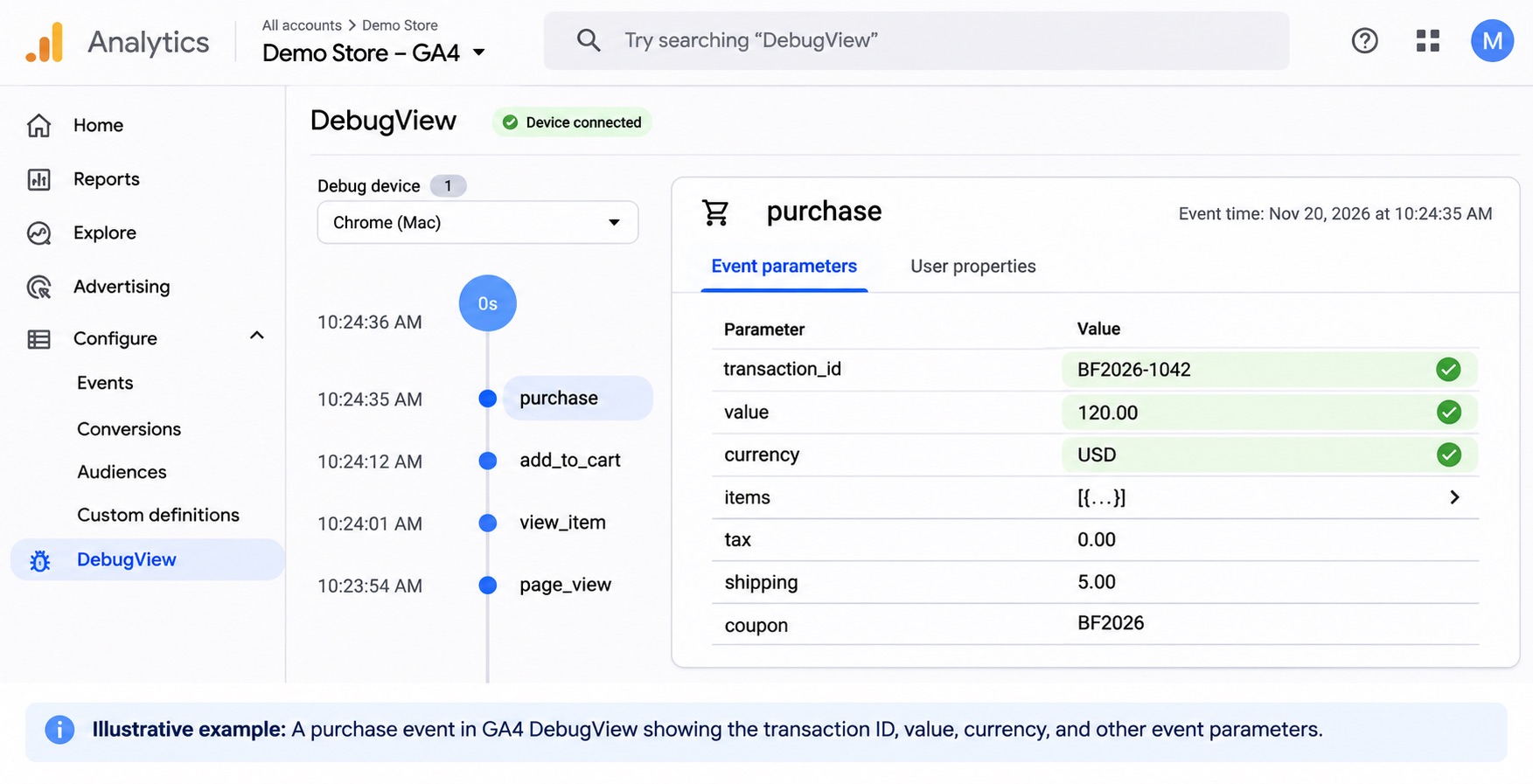
Illustrative example: a purchase event in GA4 DebugView showing the transaction ID, value, currency, and other event parameters.
Remember that GA4 and advertising platforms may report different conversion numbers because they use different attribution and processing rules. The important thing is to understand those differences and confirm that each platform is measuring the intended conversions. For more on that gap, see Why GA4 and Your CRM Don’t Match.
Check your conversion tracking before Black Friday
Before your campaigns go live, take some time to test your tracking setup. A successful test purchase can help you identify issues that might otherwise go unnoticed during a busy sales period.
Here’s a quick checklist:
- Use GTM Preview and GA4 DebugView to check that purchase events fire correctly.
- Verify that transaction IDs, purchase values, and currencies match your actual order records.
- Refresh the order confirmation page and check for duplicate purchase events.
- Review your Google Ads conversion actions and available diagnostics.
- Check Meta Pixel and CAPI events in Events Manager, including deduplication.
- Test consent behavior and campaign tracking parameters.
- Compare test purchases with your e-commerce or CRM records.
Once Black Friday starts, continue monitoring your purchases and conversion reporting. Website changes, new promotions, and checkout updates can sometimes introduce tracking issues even after everything has been tested.
Once your tracking is working correctly, the next step is understanding what the numbers mean. Our Black Friday Benchmarks page can help you compare your results with broader performance reference points as you review your campaigns.
Frequently asked questions
Do I need the Google Data Manager API to track Black Friday purchases?
Not necessarily. If your website already tracks purchases correctly through Google Ads or a supported e-commerce integration, you may not need a separate API connection. The Data Manager API is more relevant when you need to send eligible conversion information from a CRM or another internal system.
Can I use Meta Pixel and Conversions API together?
Yes. Many businesses use both to send browser and server events to Meta. When both methods report the same purchase, matching event names and event IDs help Meta recognize the duplicate reports.
Why are my GA4 purchases different from Google Ads or Meta Ads?
These platforms use different attribution methods, conversion processing rules, and reporting settings. Some conversions may also be affected by consent choices or tracking issues. Compare the reported conversions with your actual order records and investigate significant discrepancies.
How can I check whether my Black Friday conversion tracking is working?
Complete a test purchase before launching your campaigns. Use GTM Preview and GA4 DebugView to review the purchase event, then check the available conversion diagnostics in Google Ads and Meta Events Manager. Confirm that the transaction details match your store’s order records.
Final thoughts
With Black Friday approaching, it’s worth taking another look at how your business tracks purchases and measures campaign performance.
We’ve covered several tools that can help with conversion measurement, but you don’t necessarily need to implement all of them. Your existing setup might already be working well, or you may discover that a few changes — such as fixing duplicate purchase events or correcting transaction values — are all you need.
The important thing is to test your tracking before the campaigns begin and continue checking the results throughout Black Friday and Cyber Monday. That way, you’ll have a better understanding of which campaigns are generating sales and where your marketing budget is going.
Want to check whether your tracking setup is ready for Black Friday? The Black Friday Measurement Plan can help you review your campaign tracking, identify potential measurement gaps, and prepare your setup for the holiday shopping period.
You can also explore our Black Friday Benchmarks for additional context when reviewing campaign performance.
Thanks for reading. You can also share feedback on our GA4 content.
Keep reading on conversion signal
- Black Friday 2026: What's New in GA4, GTM, and Marketing Measurement?
Audit GA4 and GTM before Black Friday 2026. Validate purchase values, then review Google’s tagging and Ads updates. A new feature does not fix a broken purchase event.
- Your Meta Pixel Isn't Enough: A Practical Guide to the Conversions API
The Meta Pixel sees the browser. The Conversions API sees the booked job, the qualified call, and the purchase that finalized later. Without a shared event_id, a usable Event Match Quality score, and a verify step, you are either leaking conversions or double-counting them.
- Why GA4 and Your CRM Don't Match
GA4, Google Ads, and your CRM will not report the same number. That is not automatically broken tracking. The real failure is losing the identifiers that connect a click to revenue.
Black Friday 2026
Will you know by Saturday morning if Black Friday is working?
Enter your store's website and answer five quick questions. You get tracking links for every channel, a code per channel, a 5-minute test order, and the baseline your sale will be judged against. Free, no signup.